An AI API gateway is a service layer that sits between your application and one or more AI providers. It exposes a single stable HTTP endpoint, then handles authentication, routing, retries, caching, and usage tracking on your behalf, so your code talks to one API instead of many.
Artificial intelligence is becoming part of modern software, from customer support tools and content platforms to automation systems and developer applications. However, connecting an application to AI services can become complicated when developers need to manage authentication, API requests, responses, errors, and provider-specific requirements.
An AI API gateway provides a simpler way to connect applications with AI services through a consistent HTTP API. This guide explains what an AI API gateway is, how it works, why developers use one, and what to consider when choosing an API gateway for an AI-powered application.
What Is an AI API Gateway?
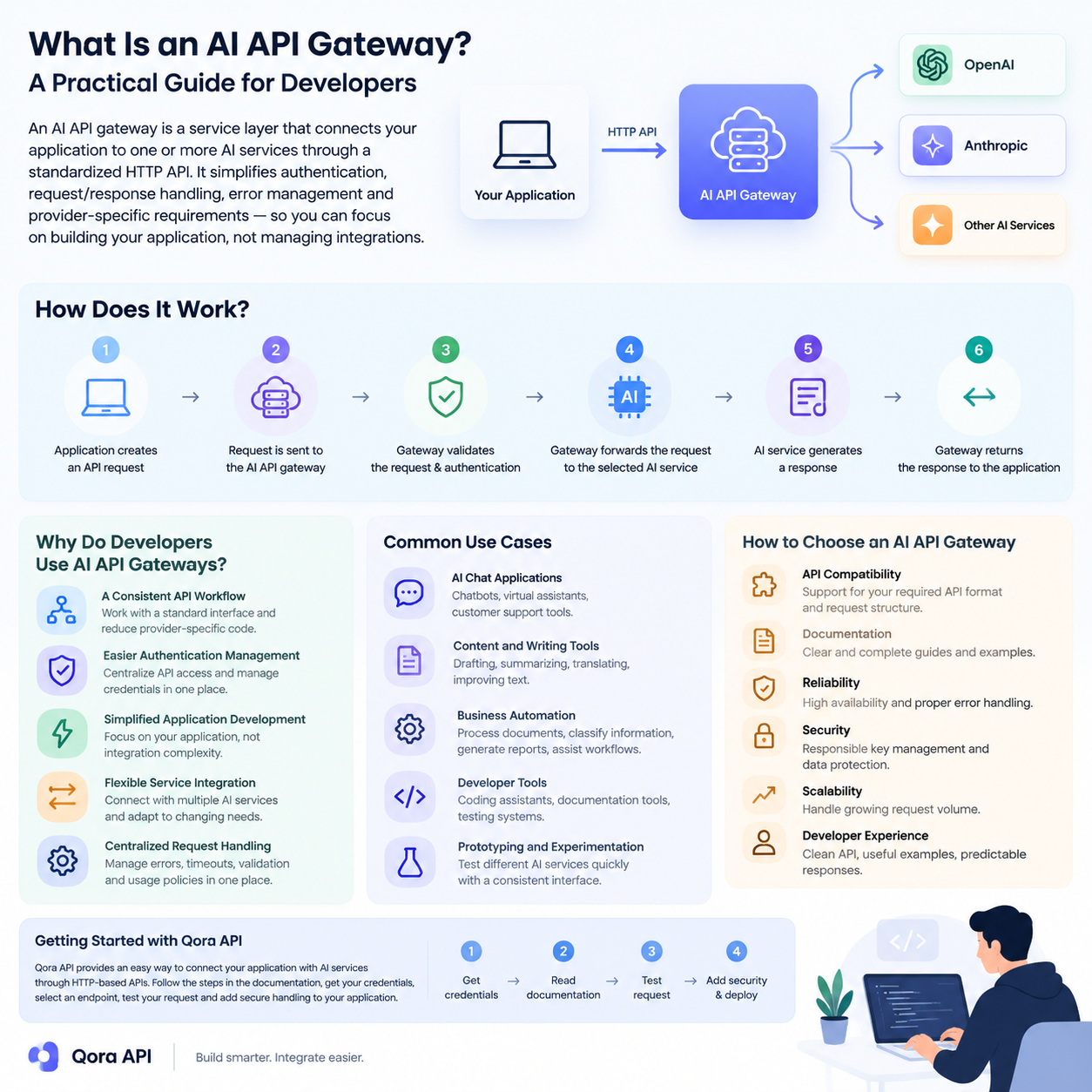
An AI API gateway is a service layer that connects an application to one or more artificial intelligence services through a standardized API interface.
Without an API gateway, an application may need to communicate with different AI providers using separate authentication methods, request formats, response structures, and error-handling systems. An AI API gateway can provide a more consistent development experience by placing a common interface between the application and the AI service.
For developers, this means the frontend or backend application can use a predictable API workflow while the gateway manages the connection to the available AI services.
An AI API gateway may be used for tasks such as:
- Sending text-generation requests
- Connecting software applications with language models
- Managing API authentication
- Processing AI responses
- Handling request errors
- Organizing access to AI-powered services
The exact features depend on the gateway provider and its supported services. Some gateways are thin proxies; others add a control plane with routing, failover, caching, quotas, and cost attribution.
How Does an AI API Gateway Work?
The basic workflow of an AI API gateway is straightforward.
First, an application sends an HTTP request to the gateway. The request usually contains authentication information, a selected model or service, and the required input data.
The gateway then processes the request and forwards it to the appropriate AI service. After the AI service returns a response, the gateway sends the result back to the application.
A typical workflow looks like this:
- The application creates an API request.
- The request is sent to the AI API gateway.
- The gateway validates the request and authentication details.
- The gateway forwards the request to the selected AI service.
- The AI service generates a response.
- The gateway returns the response to the application.
This structure allows developers to keep their application logic organized while using a consistent communication method.
Gateway architecture and the request lifecycle
Think of a gateway as a pipeline, not a single hop: each request passes through stages that add reliability without touching application code.
- Authentication and key resolution. Validate the caller, map it to a tenant, and inject provider credentials that never reach client code.
- Policy checks. Rate limits, token budgets, allowed model lists, and content filters run before any provider is billed.
- Routing. Select a target provider and model, then rewrite the request into that provider’s native format.
- Upstream call and telemetry. Dispatch with a timeout, retry transient failures, and record latency, tokens, and cost against the calling key.
Because these stages live outside your application, changing a provider becomes a configuration change rather than a deployment. That is why teams can switch AI providers without rewriting their code.
Why Do Developers Use AI API Gateways?
A Consistent API Workflow
Different AI services may use different endpoints, parameters, and response formats. A gateway can help developers work with a more consistent interface, reducing the amount of provider-specific code inside the application.
Easier Authentication Management
API credentials should be handled carefully. Instead of placing multiple provider credentials throughout an application, developers can centralize API access through a gateway and manage authentication in one location.
Simplified Application Development
When the connection layer is standardized, developers can focus more on the application itself. This can be useful when building chat interfaces, automation tools, content applications, research systems, or internal business software.
Flexible Service Integration
A gateway can make it easier to connect an application with different AI services. This may help development teams test various services or adjust their architecture as project requirements change.
Centralized Request Handling
Applications may need consistent handling for errors, timeouts, request validation, and usage policies. A gateway provides a central location where these processes can be managed.
Cost control and visibility
Provider bills do not show which feature or customer consumed the budget. A gateway sees every request, so it can attribute spend per key and enforce ceilings before the invoice arrives. See how to reduce AI API costs.
Gateway versus direct provider integration
The trade-off is whether the operational surface you gain is worth one extra network hop.
| Dimension | Direct provider integration | AI API gateway |
|---|---|---|
| API surface | One SDK and schema per provider | One canonical schema, many providers |
| Credentials | Provider keys scattered across services | Single gateway key, providers hidden |
| Failover | Custom retry logic per integration | Built-in retry and provider fallback |
| Provider switch | Code change and redeploy | Configuration change |
| Cost attribution | Reconstructed from provider dashboards | Measured per key or tenant |
| Caching | Implemented separately by each team | Shared exact and semantic cache |
| Latency | Lowest possible | Adds a small proxy hop |
Direct integration stays defensible with one provider, one team, and no cost pressure. Multiple providers, teams, or tenants tip the balance. See AI gateway versus API gateway.
Routing strategies
Routing is where a gateway earns its keep: you describe intent, and the gateway picks the target.
- Weighted routing splits traffic by percentage, keeping a secondary provider warm and making migrations gradual.
- Latency-based routing sends each request to the healthy provider with the lowest recent time to first token.
- Cost-based routing prefers the cheapest provider that satisfies the request, often by sending simple prompts to smaller models.
- Capability-based routing matches requests to models that support the required context length, modality, or schema enforcement.
- Failover routing promotes a standby provider only when the primary fails.
Most production systems combine capability routing to pick the model class, latency-based selection within it, and failover as the safety net. See how to choose the right AI model.
Failover and retry
Retries repeat a call against the same target after a short backoff; failover abandons that target for a different provider. Retries handle transient faults, while failover protects you when an entire provider has a bad hour. Classify errors before acting: authentication and schema errors never succeed on retry, while timeouts and server errors often do.
import OpenAI from "openai";

const client = new OpenAI({
  baseURL: process.env.GATEWAY_BASE_URL,
  apiKey: process.env.GATEWAY_API_KEY,
  maxRetries: 0,
});

const TARGETS = ["model-fast", "model-balanced", "model-cheap"];

export async function chat(messages) {
  let lastError;
  for (const model of TARGETS) {
    try {
      const res = await client.chat.completions.create({ model, messages });
      return res.choices[0].message.content;
    } catch (err) {
      lastError = err;
      const status = err?.status;
      if (!status || status === 429 || status >= 500) continue;
      throw err;
    }
  }
  throw lastError;
}
A gateway that already implements this logic saves you from rebuilding it in every service. See building a multi-provider AI failover layer and handling 429 rate limit errors.
Caching in front of the provider
Much production traffic is repetitive. Exact caching keys on the full payload and suits deterministic prompts. Semantic caching keys on embedding similarity, so differently worded questions share one upstream call, at the cost of a threshold you must tune. Caching belongs at the gateway, the only layer that sees every caller. See prompt caching for repeated context.
Observability and cost attribution
A gateway is the natural instrumentation point for AI traffic. Capture time to first token, total latency, tokens, cache hits, provider, retry count, and final status; aggregated by key, those metrics answer questions provider dashboards cannot. Tagging requests with a tenant identifier also lets you roll spend up per customer. See LLM observability and metering and billing AI usage per user.
Security considerations
Concentrating provider access in one place improves security only if the gateway itself is defended.
- Key management. Provider credentials live in the gateway’s secret store and never reach client applications; gateway keys should be scoped, rotatable, and revocable.
- Rate limiting. Apply limits per key, per tenant, and globally, with separate budgets for expensive models, so a bug cannot become an unbounded bill.
- Data handling. Decide whether prompts and completions are logged, for how long, and where, and redact personal data before it leaves your boundary.
These controls are cheaper to configure once than to retrofit. See AI API security for a checklist.
Build versus buy
Count the features you need today and the maintenance they imply. Build when requirements are unusual, when data must stay inside your infrastructure, or when a thin proxy over one provider is enough. Buy when you need multi-provider routing, failover, caching, quotas, and per-tenant reporting, because that is a service with its own on-call rotation. Keep your application on an OpenAI-compatible interface either way, so the decision stays reversible: see the OpenAI-compatible API guide.
Common Use Cases for AI API Gateways
AI API gateways can support many types of software projects.
AI Chat Applications
Developers can use an AI API gateway as the connection layer for chatbots, virtual assistants, and customer support tools.
Content and Writing Tools
Applications for drafting, summarizing, translating, or improving text can communicate with AI services through a gateway instead of implementing separate integrations.
Business Automation
AI-powered automation systems may use a gateway to process documents, classify information, generate reports, or assist with internal workflows.
Developer Tools
AI API gateways can also support coding assistants, documentation tools, testing systems, and other developer-focused applications.
Prototyping and Experimentation
During early development, teams may want to test different AI services quickly. A consistent gateway interface can simplify experimentation and reduce repeated integration work.
How to Choose an AI API Gateway
Before choosing an AI API gateway, developers should evaluate several factors.
API Compatibility
Check whether the gateway supports the API format and request structure required by your application. Compatibility can reduce development time and make integration easier.
Documentation
Clear documentation is important for understanding authentication, endpoints, request parameters, response formats, and error messages.
Reliability
Review the gateway’s availability, response behavior, and error-handling process. Reliable access is especially important for applications used by customers or business teams.
Security
API keys and user data should be handled responsibly. Developers should review how authentication, data transmission, and access control are managed.
Scalability
Consider whether the gateway can support the expected request volume as the application grows. A solution that works for a small prototype may require additional features for production use.
Developer Experience
A clean API, useful examples, and predictable responses can make a significant difference during implementation and maintenance.
Getting Started with Qora API
Qora API provides an API-based way for developers to connect applications with AI services. Before integrating any API, developers should review the available documentation, authentication requirements, endpoint details, and supported request formats.
A basic integration process generally includes the following steps:
- Create or obtain the required API credentials.
- Review the API documentation.
- Select the endpoint and service required by your application.
- Send a test request from your development environment.
- Check the response and error behavior.
- Add secure request handling to your application.
- Test the integration before using it in production.
Developers should avoid exposing API keys in frontend code or public repositories. Credentials should be stored securely on the server side or in protected environment variables.
Once the first request succeeds, make the integration observable before adding features: log latency and token usage, set a timeout, and decide what happens when a provider is slow. See how to integrate an AI API into your application.
Frequently asked questions
Is an AI API gateway the same as a traditional API gateway?
No. A traditional API gateway manages generic HTTP concerns such as authentication, routing, and rate limiting. An AI API gateway adds model-aware behavior on top, including token accounting, streaming responses, provider failover, and prompt-aware caching.
Does a gateway add noticeable latency?
It adds one network hop, a small fraction of a generation request, because model inference dominates end-to-end latency. A gateway can also lower average latency by routing to the fastest healthy provider or serving a cached response.
Can I use a gateway without changing my existing code?
Often yes, if the gateway exposes an OpenAI-compatible endpoint. You typically change only the base URL and the API key, and existing SDK calls keep working. Provider-specific features outside that schema may still need adaptation.
How does a gateway help with rate limits?
It centralizes them. Instead of each service discovering a provider limit independently, the gateway queues, retries with backoff, or fails over when a limit is reached. It can also enforce quotas per key so one client cannot exhaust capacity for everyone.
What should I measure first?
Start with time to first token, total latency, token counts, error rate by status code, and cost per key. Those five metrics explain most production incidents and most of a monthly bill.
Conclusion
An AI API gateway can simplify the process of connecting applications with artificial intelligence services. By providing a consistent API workflow, centralized authentication, and a structured integration layer, it can help developers build and maintain AI-powered applications more efficiently.
When selecting an AI API gateway, pay attention to compatibility, documentation, security, reliability, scalability, and overall developer experience. With the right API structure, developers can spend less time managing integrations and more time creating useful software products.
Qora API offers a practical starting point for developers who want to explore AI API integration and build applications around HTTP-based AI services. You can review the platform at qoraapi.com. If you want to quantify the saving before you adopt one, the cost comparison tool prices your workload across all major providers from a single table.
More guides in the AI API series
Continue building your AI API stack: How to Reduce AI API Costs: A Practical Guide for Developers · AI API Streaming Explained: How SSE Works and How to Consume It · How to Build an AI Chatbot with the API · Top 10 Real-World Use Cases for an AI API in 2026 AI API Cost Calculator: Compare GPT, Claude, Gemini and DeepSeek Prices.
Leave a Reply