
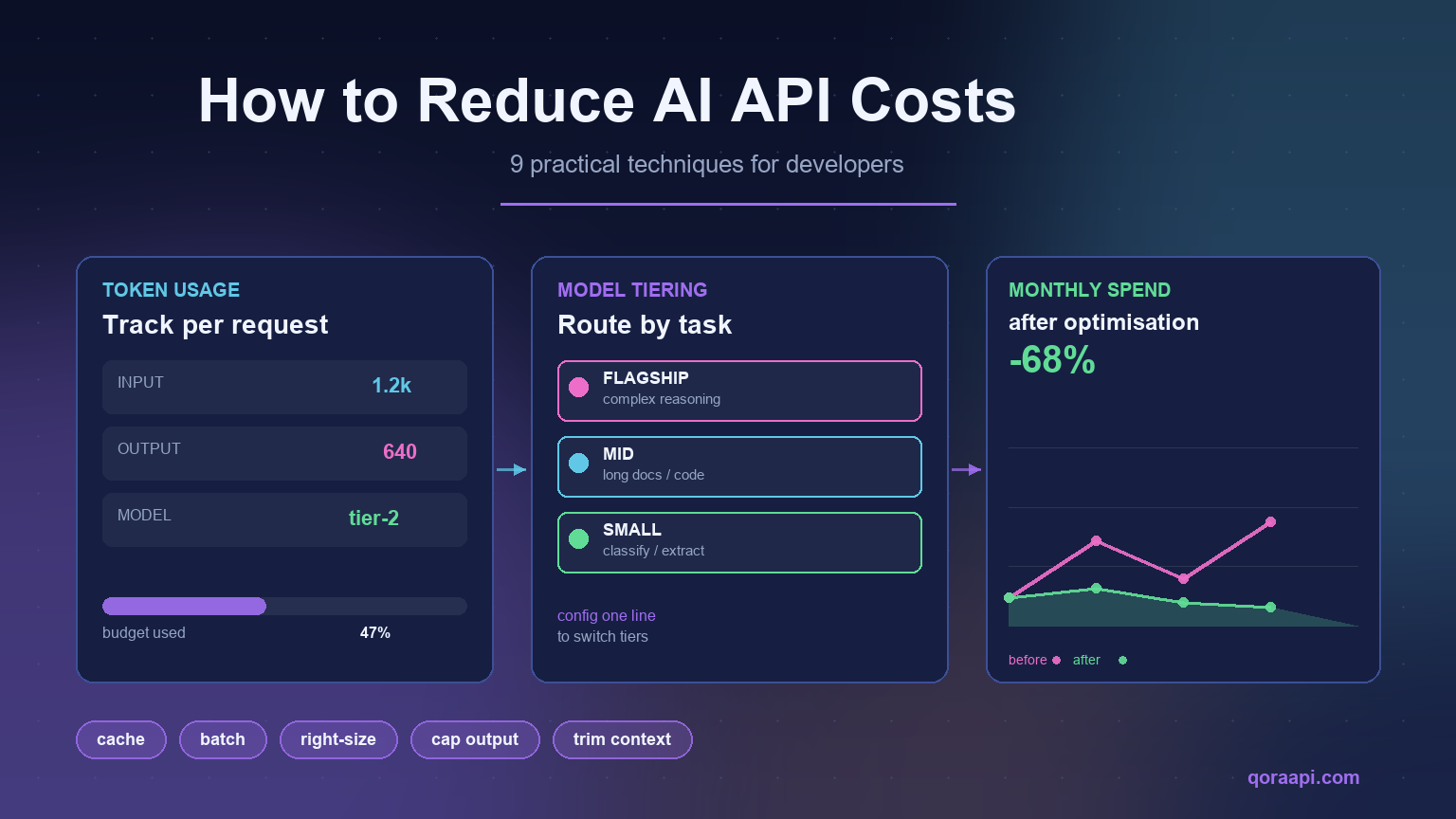
AI API costs come down to three numbers: how many tokens you send in, how many tokens come back out, and the price per token of the model you send them to. Every technique that reliably reduces AI API costs works by moving one of those three numbers — fewer input tokens, fewer output tokens, or a cheaper model per request. Nothing else moves the bill in a lasting way.
The problem is that most teams optimise the wrong thing. They shop for a cheaper provider before they know where their tokens are going, or they downgrade a model that was never the expensive part of the workflow. This guide walks through the nine changes that produce measurable savings, in the order that usually matters most, with code you can adapt directly. Whether you call OpenAI, Anthropic Claude, Google Gemini, or a mix of all three, the same arithmetic applies.
What actually drives AI API costs?
Nearly every AI provider bills by token, and nearly every one prices input tokens and output tokens differently. A token is roughly four characters of English text, or about three-quarters of a word. Output tokens are usually priced several times higher than input tokens, which is why a verbose model response costs far more than a long prompt.
The basic formula for a single request looks like this:
cost = (input_tokens  x input_price_per_1M  / 1_000_000)
     + (output_tokens x output_price_per_1M / 1_000_000)

monthly_cost = cost_per_request x requests_per_day x 30
Two consequences follow from this formula, and they explain almost every cost surprise teams run into:
- Context is not free. Every message you resend on each turn — system prompt, chat history, retrieved documents — is billed again as input. A chat that has run for twenty turns resends those twenty turns every single time.
- Output is the expensive half. Because output tokens cost more per token than input tokens, a model that answers in 800 words instead of 200 can quadruple the cost of a request even though the prompt was identical.
Understanding this split is what separates real optimisation from guesswork. Before changing anything, find out which half of the formula is dominating your bill.
Start by measuring your cost per task
You cannot reduce AI API costs you have not measured, and most teams are surprised by the answer. The cheapest diagnostic is to log the token usage of every response — most providers return this in the response body, so it costs nothing extra to capture.
import os
from openai import OpenAI

client = OpenAI()

def tracked_completion(**kwargs):
    resp = client.chat.completions.create(**kwargs)
    u = resp.usage
    print(
        f"model={resp.model} "
        f"in={u.prompt_tokens} out={u.completion_tokens} "
        f"total={u.total_tokens}"
    )
    return resp

tracked_completion(
    model="gpt-4o-mini",
    messages=[{"role": "user", "content": "Summarise this in two sentences."}],
    max_tokens=120,
)
Run this across a representative sample — a hundred real requests, not synthetic ones — and sort the results by total tokens. In practice, teams usually discover one of two patterns: either a small number of heavy requests (long context, big outputs) dominate the bill, or a very large number of small requests do. These two patterns call for completely different fixes, which is why measuring first matters.
- Few heavy requests dominate → focus on context trimming, output caps, and model right-sizing.
- Many small requests dominate → focus on caching, deduplication, and batching.
Right-size the model for each task
The single largest lever available to most teams is model selection. Flagship models cost dramatically more than their smaller siblings, and a large share of production traffic — classification, extraction, routing, short summarisation, reformatting — simply does not need a flagship.
A useful pattern is to split traffic into tiers and route each tier to the cheapest model that clears your quality bar:
| Task type | Model tier to use | Why |
|---|---|---|
| Classification, routing, intent detection | Small / fast | Short output, narrow decision — flagship reasoning is wasted |
| Structured extraction (JSON from text) | Small to mid | Deterministic task; schema constrains the output |
| Short summarisation, rewriting | Small to mid | Local transformation, limited reasoning depth |
| Long-document analysis, multi-step reasoning | Mid | Needs sustained context and inference |
| Complex agentic planning, hard code generation | Flagship | Error correction is more expensive than the token premium |
The mistake to avoid is routing by default rather than by task. Many applications send every request to one model because it was the model used during prototyping. Introducing even a simple two-tier split — a cheap model for the easy path, a strong model only when confidence is low — commonly cuts spend substantially without a noticeable quality change.
If you are still deciding how to structure this, our guide on choosing the best AI API gateway in 2026 covers the routing and fallback features worth looking for.
Cut input tokens: shorten prompts and trim context
Input tokens are the half of the bill that grows silently, because context accumulates as a side effect of building a product. Four changes recover most of it:
- Retrieve, do not dump. If you are doing RAG, send only the top few relevant chunks, not the whole document. Ranking five chunks instead of fifty can cut input by an order of magnitude with no loss in answer quality.
- Compress conversation history. Instead of resending the full transcript every turn, keep a rolling summary plus the last few exchanges. This turns linear context growth into roughly constant cost.
- Audit your system prompt. System prompts accrete rules over months. Removing instructions that no longer change behaviour is free money, and rewriting the rest more tightly compounds the saving across every request.
- Drop fields you do not use. It is common to serialise an entire database row or API response into a prompt when only two fields matter.
def build_messages(user_question, history, retrieved_chunks, system_prompt):
    # keep only the most relevant context, and only recent turns
    context = "\n\n".join(chunk.text for chunk in retrieved_chunks[:5])
    recent = history[-4:]  # last two exchanges, not the whole session
    summary = history.summary_text  # rolling summary of older turns

    messages = [{"role": "system", "content": system_prompt}]
    if summary:
        messages.append({"role": "system", "content": f"Earlier context: {summary}"})
    messages.append({"role": "system", "content": f"Reference:\n{context}"})
    messages.extend(recent)
    messages.append({"role": "user", "content": user_question})
    return messages
The mental model to keep: every token in your context window is being paid for on every single request, forever. Treat context as a recurring cost, not a one-off.
Cut output tokens: cap length and demand concise answers
Because output tokens are priced higher than input tokens, uncontrolled generation is usually the most expensive failure mode. Three habits keep it in check:
- Always set
max_tokens. A missing cap means an occasional runaway response, and runaway responses are billed in full. - Ask for the format you want. “Answer in at most three sentences” or “return JSON matching this schema” costs far less than an open-ended prompt that invites the model to explain its reasoning.
- Use structured output or JSON mode. Constraining responses to a schema removes preamble (“Sure! Here is the answer…”) and eliminates the retry loops caused by unparseable prose.
resp = client.chat.completions.create(
    model="gpt-4o-mini",
    messages=[
        {"role": "system", "content": "Reply in at most 2 sentences. No preamble."},
        {"role": "user", "content": "What causes a 429 error?"},
    ],
    max_tokens=80,          # hard ceiling on billed output
    temperature=0.2,        # less rambling, more reproducible
)
Note that streaming does not reduce cost — it changes how the response is delivered, not how many tokens are generated. Streaming is worth using for perceived latency, but it should never be counted as an optimisation.
Cache everything you can
Most production AI applications send far more duplicate traffic than their authors expect: the same document summarised repeatedly, the same classification prompt on near-identical inputs, the same generated response during development and testing. Caching attacks this directly, and it is often the highest-return change available.
There are two layers worth implementing:
- Application-level caching. Hash the normalised request — model, system prompt, user content, and the generation parameters that matter — and store the response. Set a TTL that matches how fresh the answer needs to be.
- Provider prompt caching. Several providers now discount repeated prompt prefixes within a time window. Structuring your prompt so the large stable part (system prompt, reference document) comes first and the variable part comes last lets you benefit from this automatically.
import hashlib, json, time

_cache = {}
TTL_SECONDS = 3600

def cache_key(model, messages, **params):
    payload = json.dumps(
        {"model": model, "messages": messages, **params}, sort_keys=True
    )
    return hashlib.sha256(payload.encode()).hexdigest()

def cached_completion(model, messages, **params):
    key = cache_key(model, messages, **params)
    hit = _cache.get(key)
    if hit and time.time() - hit["ts"] < TTL_SECONDS:
        return hit["content"], True      # cache hit, zero tokens billed

    resp = client.chat.completions.create(model=model, messages=messages, **params)
    content = resp.choices[0].message.content
    _cache[key] = {"ts": time.time(), "content": content}
    return content, False
The stable-prefix-first rule is worth restating because it is easy to miss: put your long system prompt and reference material at the top of the messages array, and the user-specific question at the bottom. Reversed ordering can make a large fraction of the prompt ineligible for prefix caching.
Use batch endpoints for non-urgent work
If a request does not need an answer within seconds, it probably should not be sent interactively. Batch endpoints accept large groups of requests and process them asynchronously, typically at a meaningful discount in exchange for longer completion windows.
Good candidates for batching include nightly document processing, bulk classification, dataset labelling, report generation, backfills, and evaluation runs. Interactive traffic — chat, autocomplete, anything a user is waiting on — should stay on the real-time endpoint. The saving is real, but only for work where latency genuinely does not matter.
Stop paying for retries and failures
Failed requests are a quiet line item. A timeout at the client, a malformed response, or an aggressive retry loop can bill the same work two or three times without anyone noticing, because the application only records the successful result.
- Use exponential backoff with jitter on 429 and 5xx responses. Immediate retries against a rate limit usually fail again, and each attempt is billed.
- Set a client timeout slightly shorter than your server timeout so you stop waiting before the provider does, and you know the request’s real state.
- Log cost per successful task, not per request. This is the metric that exposes retry waste. If requests are rising faster than completed tasks, retries are eating budget.
- Validate before you send. Oversized inputs, unsupported parameters, and malformed JSON are cheap to catch locally and expensive to discover upstream.
import random, time

def with_retry(fn, attempts=4):
    for i in range(attempts):
        try:
            return fn()
        except Exception as e:
            status = getattr(e, "status_code", None)
            if status not in (429, 500, 502, 503, 504) or i == attempts - 1:
                raise
            # exponential backoff with jitter
            time.sleep(min(2 ** i, 30) + random.uniform(0, 0.5))
Consolidate routing through one OpenAI-compatible endpoint
Once the per-request optimisations are in place, the remaining lever is structural: how many providers you integrate with, and how easily you can move traffic between them. Maintaining separate SDK clients, key management, and billing for OpenAI, Anthropic, and Google is not just engineering overhead — it removes your ability to arbitrage price at all.
Routing through a single OpenAI-compatible API changes that. Because the request envelope is identical across providers, you can switch the model string — or the whole upstream — in configuration rather than in application code. That has two cost consequences:
- Model tiering becomes a config change. Moving an endpoint from a flagship model to a smaller one is one string, so you can actually run the tiering strategy described above instead of just planning it.
- Price changes stop being migrations. When a provider raises rates or a cheaper model reaches quality parity, you redirect traffic without a refactor.
A gateway also consolidates the operational side — one key, one bill, one place to set spend limits and watch usage — which is what makes the savings durable rather than a one-time cleanup. To understand the layer itself, see what an AI API gateway is and how it works.
A practical cost-reduction checklist
Work through these in order. The first four are usually where the money is:
- Log
prompt_tokensandcompletion_tokensfor every call; rank requests by total. - Split traffic into tiers and route the easy majority to a smaller model.
- Set
max_tokenson every request; no uncapped generations. - Put long, stable content first in the prompt; variable content last.
- Cache responses with a TTL appropriate to the task.
- Trim RAG context to the top few chunks; summarise old chat turns.
- Move nightly and bulk workloads to a batch endpoint.
- Add exponential backoff with jitter; alert on cost per completed task.
- Set a monthly spend limit and a usage alert before you need them.
- Route through one OpenAI-compatible endpoint so model changes stay a config edit.
Frequently asked questions
What is the fastest way to reduce AI API costs?
Measure token usage per request first, then apply the largest lever you find. In most applications the biggest single saving comes from routing simple tasks — classification, extraction, short summarisation — to a smaller model, followed by capping max_tokens so responses cannot run long.
Does streaming reduce cost?
No. Streaming changes how the response is delivered to the client, not how many tokens the model generates. You are billed for the same completion either way. Use streaming to improve perceived latency, and use output caps and concise instructions to reduce cost.
Are input or output tokens more expensive?
Output tokens are typically priced several times higher than input tokens per million. This is why limiting response length often saves more than shortening the prompt, and why an uncapped max_tokens is one of the most expensive defaults you can ship.
Is caching AI responses safe?
It is safe when the task is deterministic and the underlying data has not changed. Cache keyed on the full normalised request, use a TTL that matches how fresh the answer must be, and use a low temperature for cacheable tasks so identical inputs produce identical outputs. Avoid caching anything personalised per user unless the user ID is part of the key.
Will a cheaper model hurt quality?
It depends entirely on the task, which is why tiering beats blanket downgrades. Small models match flagship quality on narrow, well-specified tasks such as classification and extraction. They fall behind on long-horizon reasoning and complex code generation. Route by task, and keep a flagship fallback for low-confidence cases rather than switching everything at once.
Can an AI API gateway lower total cost?
It can, in two ways. Directly, when the gateway’s pooled volume gives access to better rates than a single account, or when it offers cheaper routing for the same model. Indirectly and often more significantly, by making model switching a configuration change — so you can act on price and quality changes immediately instead of deferring them to a future refactor.
How should I budget for an AI feature before launch?
Estimate cost per task rather than cost per request. Run a hundred representative requests, take the average token count, multiply by your expected monthly task volume, then add twenty to thirty percent for retries, edge cases, and growth. Watch cost per completed task in production — it is the metric that reveals waste earliest.
Reducing AI API costs is less about finding a cheaper provider and more about controlling three variables: input tokens, output tokens, and model choice per request. Measure first, tier your models by task, cap every response, cache what repeats, batch what can wait, and keep routing flexible enough that you can change your mind cheaply. Teams that do this usually find the savings were never in the unit price — they were in the requests.
If you want one endpoint where model choice stays a configuration change, create a key at qoraapi.com and point your existing OpenAI client at https://qoraapi.com/v1. For the wiring itself, our walkthrough on integrating an AI API into your application covers the request and response handling in detail. Before you pick a lever, it is worth knowing what your current mix actually costs — the AI API cost calculator prices any monthly token volume against every major model. If you want the numbers behind these levers, the 2026 AI API Cost Index prices six production workloads against 22 models and shows exactly where the spread is large enough to be worth acting on.
Related reading
- Semantic Caching for AI APIs: Cut Latency and Cost by Up to 60%
- Prompt Caching Explained: How to Cut Costs on Repeated Context
- Batch AI APIs: Processing Millions of Requests Affordably
- Metering and Billing AI Usage Per User: A Practical SaaS Guide
- Image Generation APIs in Production: Moderation, Caching, and Cost
- Fine-tuning vs Prompting: When to Train Your Own Model
- HIPAA and SOC 2 for AI Apps: A Developer’s Compliance Guide
- AI Gateway vs API Gateway: Key Differences and When to Use Each
- AI API Cost Calculator: Compare GPT, Claude, Gemini and DeepSeek Prices
- The 2026 AI API Cost Index: What 22 Models Really Cost Per Workload
- Multi-Agent Orchestration: Patterns and Pitfalls
- AI API Data Privacy & GDPR: Residency, Logging, and Keeping Prompts Safe
- How to Connect Cursor, Cline and Continue to a Custom AI API Endpoint
- Text-to-SQL: Letting Users Query Your Database with AI
Leave a Reply