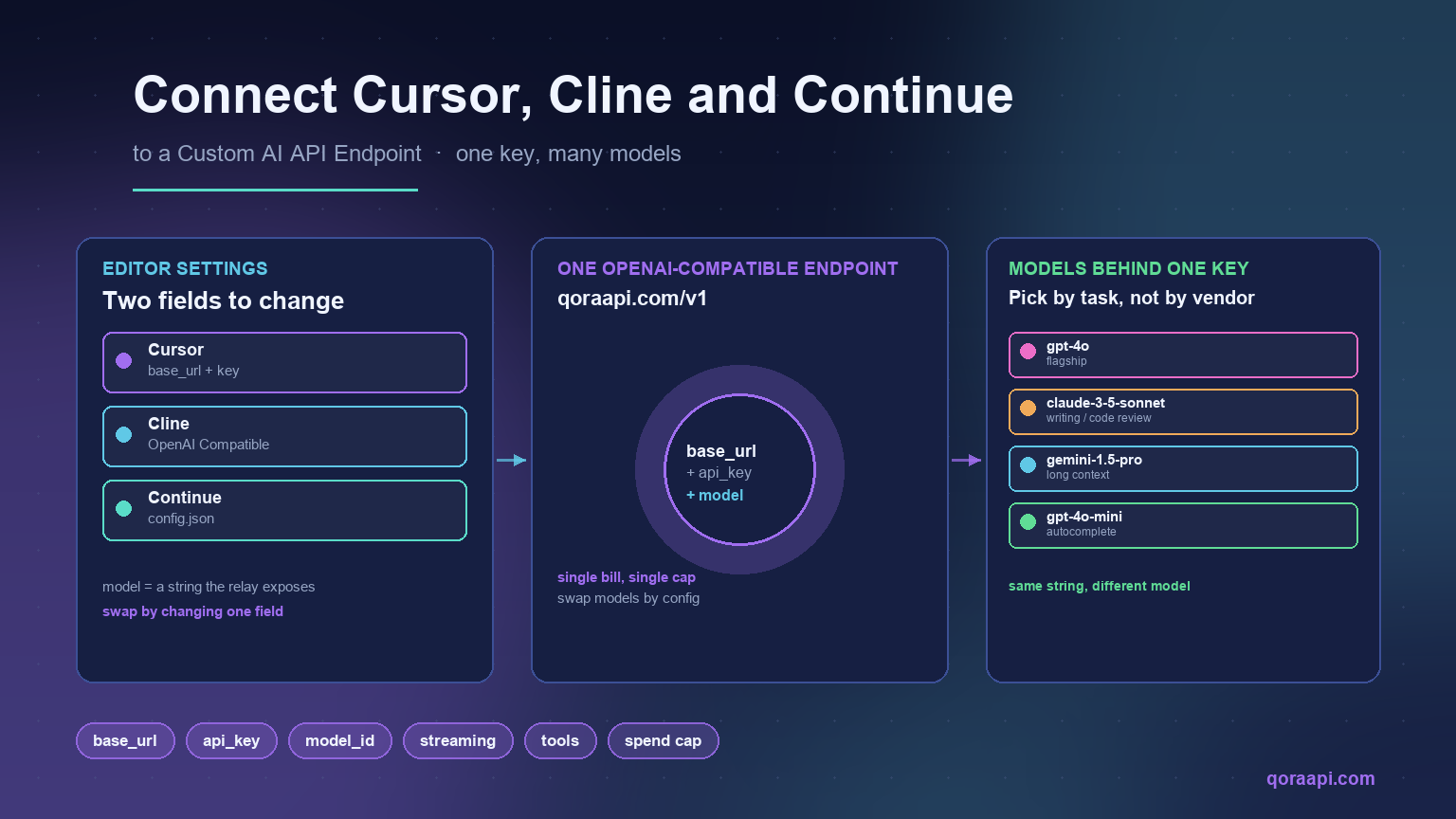
Cursor, Cline, and Continue.dev all speak the same protocol: an OpenAI-compatible API. If your provider exposes that interface, you can point every one of them at it with a single base_url change — no plugin fork, no custom client, no SDK rewrite. This guide walks through the exact steps for each tool, the configuration fields to set, and the pitfalls that catch people the first time they swap the endpoint.
The audience for this is developers who already use one of these editors daily and want to plug in their own key, route through a relay that gives them cheaper pricing, or use a model the editor does not expose by default. The change is small, the payoff is large, and the setup is roughly five minutes per tool.
Why connect a coding tool to a custom endpoint
The default OpenAI key inside Cursor, Cline, or Continue gives you one provider’s models at one provider’s prices. A custom endpoint — typically a relay or an OpenAI-compatible gateway — opens four doors that matter in production:
- One key for many models. Use GPT, Claude, and Gemini behind a single API key, switching models by changing a string. Our guide to the OpenAI-compatible API explains the contract that makes this possible.
- Cost control. Routes through relays that offer cheaper rates, and routes the easy work — autocomplete, naming, simple refactors — to a smaller model while reserving flagship inference for hard problems. See our guide to reducing AI API costs for the broader pattern.
- Provider redundancy. If one upstream is throttled or degraded, you point the editor at another in seconds. See our guide on handling rate limits and 429 errors for why this matters.
- Centralised billing. One bill, one spend cap, one place to watch usage instead of separate statements per provider.
What “OpenAI-compatible” means here
When a tool says it supports an “OpenAI-compatible endpoint”, it means the tool will send HTTP requests to whatever URL you give it, using OpenAI’s Authorization: Bearer <key> header and the same JSON request body OpenAI does. The provider on the other side is responsible for returning a response in the same shape, including streaming, function calling, and tool use.
From your perspective, that means two fields do almost all the work:
base_url— the URL of the OpenAI-compatible API. For qoraapi.com, this ishttps://qoraapi.com/v1. The path/v1/chat/completionsis appended by the tool.api_key— the bearer token issued by that endpoint. For most relays, including Qora API, this is generated in the dashboard after sign-up.
The third input is the model name — a string like gpt-4o, claude-3-5-sonnet, or a relay-specific alias — which the provider maps to the underlying model. Switching it is how you move from GPT to Claude to Gemini without changing any other field.
Connect Cursor to a custom endpoint
Cursor exposes an “OpenAI API Key” field in its settings, and in newer versions a separate “Override OpenAI Base URL” toggle. The flow is:
- Open Cursor, press
Ctrl+,(orCmd+,on macOS) to open Settings. - Go to Models (or search “OpenAI API Key” in the settings search).
- Paste your custom endpoint’s API key into OpenAI API Key.
- If present, enable Override OpenAI Base URL and set it to your endpoint, e.g.
https://qoraapi.com/v1. - Under Custom Models (or in
~/.cursor/config.json), add the models you want, each one with the model string the relay exposes — for examplegpt-4o,claude-3-5-sonnet, or a Qora-specific alias.
Save and restart Cursor if a model does not appear in the model picker. Verify the setup by opening a chat and asking a one-line question — if you get a normal answer, the connection is good; if you get a 401 or 404, the key or the base URL is wrong.
Connect Cline (VS Code) to a custom endpoint
Cline is the VS Code extension that runs Claude or GPT inside your editor with full tool use. Its settings panel has first-class support for “OpenAI Compatible” providers, which is the option you want for any custom endpoint.
- In VS Code, click the Cline icon in the Activity Bar, then the gear icon to open Cline’s settings.
- Set API Provider to OpenAI Compatible.
- Fill in:
- OpenAI Base URL:
https://qoraapi.com/v1 - OpenAI API Key: your custom endpoint key
- Model ID: the model string, e.g.
gpt-4oorclaude-3-5-sonnet
- OpenAI Base URL:
- If your endpoint advertises a different model set than OpenAI’s defaults, the Model ID must exactly match one the relay exposes — typos here are the most common reason for a “model not found” error.
Cline uses the configured endpoint for both chat and tool calls (file edits, terminal commands), so getting the base URL right means everything else just works — including agent mode.
Connect Continue.dev to a custom endpoint
Continue is configured entirely through a JSON file, which gives you fine-grained control and is easy to script across a team. The default location is ~/.continue/config.json.
{
  "models": [
    {
      "title": "Qora GPT-4o",
      "provider": "openai",
      "model": "gpt-4o",
      "apiBase": "https://qoraapi.com/v1",
      "apiKey": "YOUR_KEY"
    },
    {
      "title": "Qora Claude 3.5 Sonnet",
      "provider": "openai",
      "model": "claude-3-5-sonnet",
      "apiBase": "https://qoraapi.com/v1",
      "apiKey": "YOUR_KEY"
    }
  ],
  "tabAutocompleteModel": {
    "title": "Qora Autocomplete",
    "provider": "openai",
    "model": "gpt-4o-mini",
    "apiBase": "https://qoraapi.com/v1",
    "apiKey": "YOUR_KEY"
  }
}
The split between the main models array and tabAutocompleteModel is intentional: it lets a small, cheap model serve inline completions while the larger model handles chat — the same idea behind our guide to reducing AI API costs.
Picking model identifiers
The model string you pass to the editor is interpreted by your endpoint, not by the editor itself. Common identifiers across most OpenAI-compatible relays are:
| Family | Example model strings |
|---|---|
| OpenAI GPT | gpt-4o, gpt-4o-mini, o1-mini, o1-preview |
| Anthropic Claude | claude-3-5-sonnet, claude-3-haiku, claude-3-opus |
| Google Gemini | gemini-1.5-pro, gemini-1.5-flash |
| Open weights | llama-3.1-70b, mistral-large, qwen-coder-32b |
If a relay exposes its own aliases, those are usually listed in the dashboard. The simplest rule: copy the model string exactly as the relay documents it, and never assume the editor knows what your relay supports — it sends the string verbatim.
Verifying the connection works
Before trusting the setup with real code work, send a known request through the same base URL the editor is using. This is the same flow used in our general AI API integration guide, and it catches almost every configuration mistake in a few seconds:
curl https://qoraapi.com/v1/chat/completions \
  -H "Authorization: Bearer YOUR_KEY" \
  -H "Content-Type: application/json" \
  -d '{
    "model": "gpt-4o-mini",
    "messages": [{"role": "user", "content": "Reply with the word OK."}]
  }'
A correct response looks like a normal OpenAI chat completion object. If the editor still fails after this succeeds, the problem is on the editor side — most often a cached config, a base URL with a trailing slash, or a model name the editor pre-validated against OpenAI’s own list rather than your relay’s.
Common pitfalls and how to fix them
- Trailing slash in the base URL. Most editors append
/chat/completionsautomatically. A trailing slash onhttps://qoraapi.com/v1/turns intohttps://qoraapi.com/v1//chat/completions, which usually 404s. Strip it. - Wrong model identifier. Editors often pre-fill the model picker with OpenAI’s defaults. If you typed
gpt4oinstead ofgpt-4o, the relay will reject it. Copy the string from the relay’s model list. - Streaming stopped working. Some relays stream by default; some require a feature flag. If your editor streams against OpenAI but not against your relay, check whether the relay documents streaming support for that model.
- Tool use or function calling fails. The OpenAI-compatible contract covers most of tool use, but coverage varies. If a tool call is silently dropped, try a smaller request first to isolate whether it is the tool or the model.
- Editor still uses OpenAI after saving. Restart the editor, or fully quit and reopen. Some tools cache the config in memory until relaunch.
- Account-wide key vs project-scoped key. A leaked editor key on a developer’s laptop can drain an account. Use the relay’s per-key spend caps and rotation to limit blast radius.
Setup checklist
- Verify the endpoint responds to a simple
curlrequest with the same key the editor will use. - Set the base URL to the OpenAI-compatible path (no trailing slash).
- Use a model identifier exactly as the relay documents it.
- Save and, if needed, restart the editor so it picks up the new config.
- Ask one trivial question to confirm chat works end-to-end.
- Try one tool-using task (a file edit, a terminal command) to confirm tools work.
- Set a spend cap on the key at the relay so a runaway loop cannot drain the account.
- Pin a smaller model for autocomplete to keep inline suggestion costs low.
Frequently asked questions
Does Cursor support a custom OpenAI endpoint?
Yes. Cursor has an “Override OpenAI Base URL” setting (alongside the OpenAI API Key field) that points the editor at any OpenAI-compatible endpoint. Combined with the “Custom Models” entry, you can use any model the relay supports without leaving Cursor.
How do I use a custom API endpoint with Cline?
In Cline’s settings, choose API Provider → OpenAI Compatible, then fill in the base URL (e.g. https://qoraapi.com/v1), your API key, and the model ID the relay exposes. Cline will use the same endpoint for chat, tool calls, and agent mode.
Where is Continue’s config file?
The default location is ~/.continue/config.json. Add entries under models with provider: "openai", apiBase pointing at your endpoint, apiKey for the bearer token, and model set to the relay’s model string. Continue picks up changes on save.
Can I use the same key across all three tools?
Yes. As long as the endpoint is OpenAI-compatible and the key is valid against it, the same bearer token works in Cursor, Cline, and Continue simultaneously. This is one of the main reasons to route through a single relay rather than juggling separate provider accounts.
How do I switch models inside the editor?
Change the model string in the editor’s model picker — Cursor, Cline, and Continue all keep the same base URL and key and only swap the model identifier. That single field decides whether you are talking to GPT, Claude, Gemini, or an open-weights model behind the relay.
Is it safe to paste my API key into an editor?
Editor settings files live on your local disk. Treat them like an .env file: do not commit them, do not share them, and rotate the key if a laptop is lost. On the server side, prefer per-tool scoped keys with spend caps so a leak cannot drain the account.
Will streaming and function calling still work?
Usually yes — well-built OpenAI-compatible relays support both. If something breaks, isolate it: first verify a plain curl chat completion works, then enable streaming in the editor, then enable tool use. Each step pins down where the gap is.
Wiring Cursor, Cline, and Continue to a custom API endpoint is mostly a configuration change — a base URL, a key, and a model string. Once that is in place, the rest of the editor’s capabilities continue to work because the contract is the one OpenAI defined. If you want a single endpoint that gives you GPT, Claude, and Gemini under one key, create an account at qoraapi.com and paste the base URL and key into whichever editor you use today.
Leave a Reply