
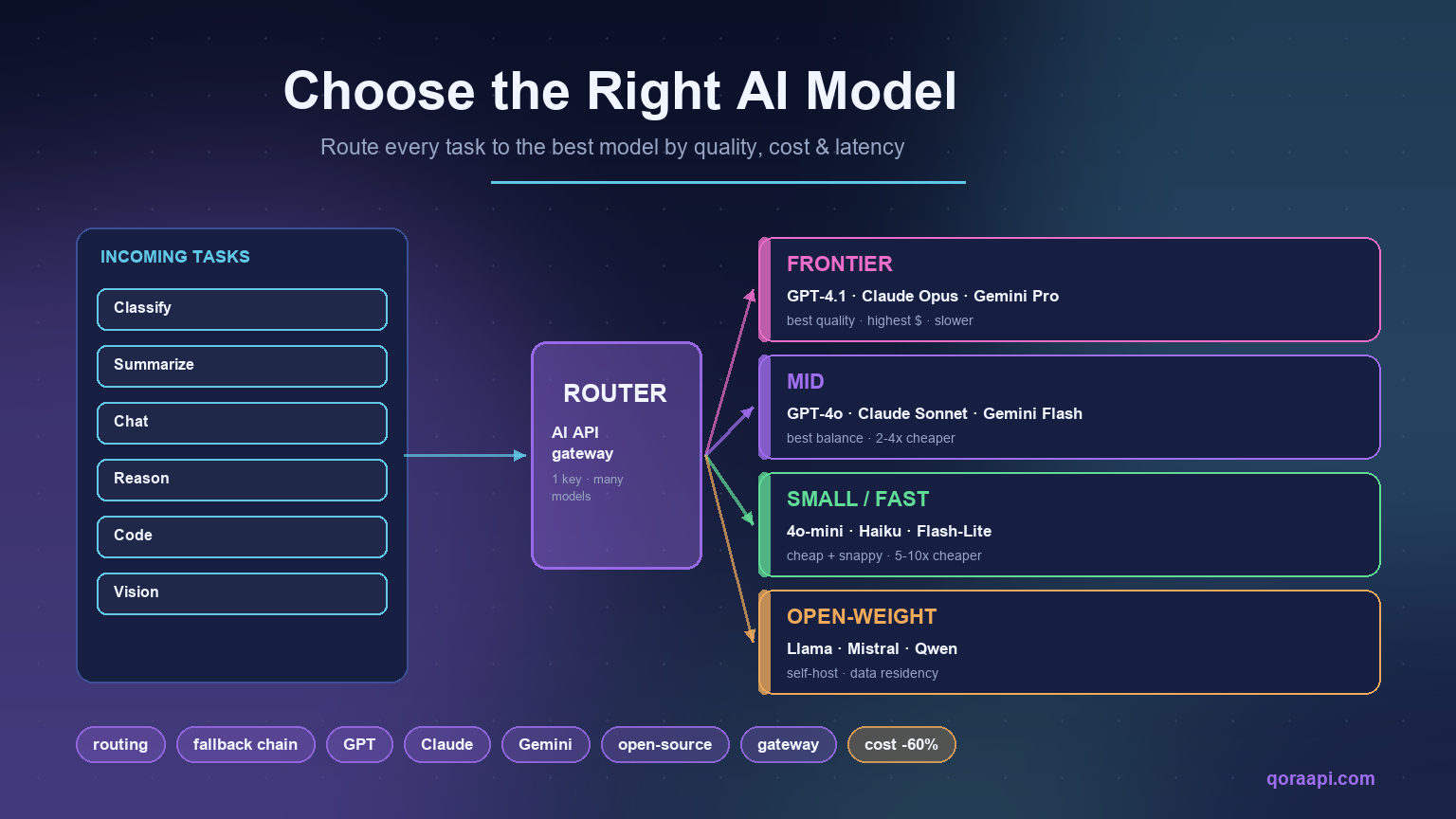
Most teams pick one AI model on day one and never revisit the decision. That is the expensive way to build. The right way to run AI in production is to treat model selection as a routing problem: every request goes to the model that best balances quality, cost, and latency for that specific task — and a unified API gateway lets you change that mapping without rewriting your code.
The short answer: classify every request by task type and stakes, map each class to the cheapest model tier that clears your quality bar, add a fallback chain so rate limits never break a feature, and measure quality per class so the mapping stays honest. Most teams land on three to five tiers behind one endpoint.
This guide gives you a decision framework, a copyable routing pattern, and the mistakes that quietly inflate most AI bills.
Why “one model for everything” is the default mistake
When you start, a single frontier model is the path of least resistance: one key, one prompt format, one set of eval numbers. The problem appears at scale. A two-second summarization job and a thirty-second legal-analysis job do not need the same model, but a single-model setup forces you to pay frontier prices for both.
Routing answers one question per request: what is the cheapest model that clears the quality bar here? Teams that route typically cut inference spend 30–60% while holding output quality flat. It is also a reliability feature: with more than one candidate model, an outage or a burst of 429s becomes a degraded path instead of an incident. Our multi-provider failover guide covers that side in depth.
The 2026 model landscape, in tiers
You do not need to track every release. Sort models into four tiers and you have enough structure to route almost any workload:
- Frontier — highest quality on hard reasoning, coding, and agentic tasks (GPT-4.1-class, Claude Opus-class, Gemini Pro-class). Use sparingly.
- Mid — excellent general quality at roughly half the price (GPT-4o-class, Claude Sonnet-class, Gemini Flash-class). Your default workhorse.
- Small / fast — classification, extraction, summarization, routing itself (GPT-4o-mini, Claude Haiku, Gemini Flash-Lite). Cheap enough to call per request.
- Open-weight — self-hosted or provider-served Llama, Mistral, Qwen. Best for data residency, customization, or the lowest unit cost at volume.
Names change every few months; the tiers do not. Reasoning models are not simply a better mid tier — they trade latency for accuracy on multi-step problems, so give them their own routing class. Our guide to reasoning models explains when that trade pays off.
The four dimensions that actually decide routing
Quality gets the attention, but four dimensions drive most decisions:
| Dimension | What it changes | Routing rule of thumb |
|---|---|---|
| Quality | Correctness on hard tasks | Only pay for frontier on tasks where a wrong answer is costly |
| Cost | Unit price per 1K tokens | Push every repetitive task down a tier |
| Latency | Time-to-first-token (TTFT) | Interactive UX needs small/fast; batch jobs can use frontier |
| Context window | How much you can stuff in one call | Long-doc tasks may force a specific model regardless of price |
Two secondary dimensions matter for specific features: multimodal support and tool-use reliability. If a task needs function calling, route to a model you have validated for it — see our guide on AI function calling and tool use.
A simple task-to-model routing table
Start with a mapping you can defend, then tune it from production data:
| Task | Recommended tier | Why |
|---|---|---|
| Intent classification | Small / fast | Short, repetitive, quality bar is low |
| Summarization | Small / fast or Mid | Mid only if source is long or nuanced |
| Extract to JSON | Mid (structured outputs) | Needs reliable schema — see structured outputs |
| Chat assistant | Mid | Best quality/cost balance for open conversation |
| Hard coding / math | Frontier | Wrong answers are expensive to debug |
| Document Q&A (RAG) | Mid + embeddings | Pair with embeddings + RAG |
| Vision / image input | Multimodal model | Only some models support it |
Cost and latency tradeoffs (without fake price tags)
Prices move constantly, so reason in ratios, not absolutes:
- A small/fast model typically costs 5–10× less per token than a frontier model.
- A mid model typically costs 2–4× less than frontier while covering 80–90% of real tasks.
- TTFT on small/fast models is often 2–5× lower, which is what users feel as “snappy.”
The win is two-sided: you spend less and the app feels faster, because the heavy model only runs where it earns its keep. For the deeper levers, see our AI API cost reduction guide.
Defining a routing policy before you write code
A routing policy is a written rule that says, for each class of request, which model runs first, what happens on failure, and how much an answer may cost. Write it down first. Otherwise routing gets decided implicitly by whoever last edited the prompt, and nobody can explain why a task costs what it costs.
Five strategies are worth knowing, and most production systems combine two or three:
| Strategy | How it decides | Best for | Main risk |
|---|---|---|---|
| Static mapping | Task type is looked up in a fixed table | Stable workloads with predictable classes | Goes stale as models improve |
| Cost-based | Cheapest model whose measured pass rate clears a threshold | High-volume, well-measured tasks | Needs reliable per-task evals |
| Latency-based | Fastest healthy model on interactive paths | Chat, autocomplete, live UI | Can under-serve tasks that need more reasoning |
| Capability-based | Filter by hard requirements first: context length, tools, vision, region | Mixed and multimodal workloads | Filtering can leave only one candidate |
| Quality-escalation | Start cheap, retry stronger when a check fails | Tasks with an automated correctness signal | Doubles latency and cost on escalated requests |
A workable default is capability filtering first, then static mapping within the surviving candidates, then cost-based tuning as eval data matures. Quality-escalation is powerful, but only when a cheap automated check can tell you the first answer was wrong — a schema validator, a unit test, or a small verifier model.
Classifying requests by task and stakes
Task type tells you what a request is; stakes tell you how much a wrong answer costs. Route on both. Classify with deterministic rules or a small/fast model, and keep the classifier cheap. Useful signals:
- Task class — classify, extract, summarize, generate, reason, act.
- Input size — token count drives both cost and context-window eligibility.
- Output shape — free text, strict JSON, or a tool call.
- Stakes — shown to a user, stored in a system of record, or used to trigger an action?
- Tenant and plan — an enterprise tier may buy a better default model than a free tier.
If the classifier is itself an LLM call, keep it fast and cached. Routing should add single-digit milliseconds, not another round trip that erases the latency you were trying to save.
Model routing in practice
The cleanest implementation is a lookup table plus a fallback chain. Route by task, and if the preferred model is rate-limited, fall through instead of failing:
# Route each request to the cheapest model that clears the quality bar.
ROUTES = {
    "classify":  "gpt-4o-mini",        # cheap, fast, good enough
    "summarize": "claude-3-5-haiku",   # small/fast tier
    "chat":      "gpt-4o",             # mid tier workhorse
    "reason":    "claude-opus-4",      # frontier, only when needed
    "code":      "gpt-4o",
    "vision":    "gemini-2.0-pro",     # multimodal
}

FALLBACK = ["gpt-4o", "claude-3-5-sonnet", "gpt-4o-mini"]

def call_model(task, messages):
    model = ROUTES.get(task, "gpt-4o")
    return client.chat.completions.create(model=model, messages=messages)

# If the preferred model is throttled, fall through instead of erroring.
def call_with_fallback(messages, preferred="gpt-4o"):
    for model in [preferred, *FALLBACK]:
        try:
            return client.chat.completions.create(model=model, messages=messages)
        except RateLimitError:
            continue
    raise RuntimeError("all models exhausted")
Wrap streaming the same way if your UX needs tokens as they arrive — our streaming / SSE guide covers the proxy-buffering trap that breaks most first deployments.
Escalation and fallback ladders
Fallback and escalation look similar but solve opposite problems. Fallback moves sideways when the preferred model is unavailable: same task, same quality bar, different vendor. Escalation moves upward when the model answered but the answer failed a check: same vendor class, higher tier, more cost.
Keep them separate in code, because they have different failure modes and budgets. Fallback should be invisible to the user. Escalation should be logged and reviewed, because a rising escalation rate usually means your cheap tier is being asked to do something it was never good at.
ESCALATION_LADDER = ["gpt-4o-mini", "gpt-4o", "claude-opus-4"]

def call_with_escalation(task, messages, validate):
    for tier, model in enumerate(ESCALATION_LADDER):
        try:
            response = client.chat.completions.create(
                model=model, messages=messages)
        except RateLimitError:
            continue                      # sideways: try the next vendor
        if validate(response):            # upward only when quality fails
            metrics.increment("routing.escalations", tier)
            return response
    raise RuntimeError("ladder exhausted")
Cap the ladder at two or three rungs. An unbounded ladder turns one bad prompt into a chain of expensive calls and hides the real bug.
Canarying and evaluating a routing change
Every routing change is a production change, so ship it like one. Send a small slice of traffic to the new mapping, hold the rest on the current one, and compare on metrics rather than vibes.
- Freeze the eval set. Keep labeled real requests per task class and reuse them across changes.
- Split traffic deterministically. Hash a stable request id so a user never flips mappings mid-session.
- Watch three signals. Pass rate, p95 latency, and cost per successful request.
- Decide with a rule. Promote only if pass rate holds and cost per success improves.
- Keep a rollback switch. The mapping should be configuration, not a deploy.
For a harness for step one, our guide to evaluating and benchmarking models shows how to build one that survives real traffic.
Measuring routing quality
Routing only stays correct if you can see it. Log four fields per request: task class, the model that answered, latency, and token counts.
| Metric | What it reveals | Action when it degrades |
|---|---|---|
| Pass rate per task class | Whether the assigned tier is good enough | Move that class up a tier |
| Cost per successful request | True unit economics, including retries | Push repetitive classes down a tier |
| Escalation rate | How often the cheap tier failed a check | Fix the prompt or reclassify the task |
| Fallback rate | Provider health and rate-limit pressure | Add capacity or widen the candidate set |
| p95 TTFT by tier | Whether the interactive path is fast | Move interactive classes to faster models |
Review monthly and after any major model release. The tiers are stable, but the best model within a tier changes often — see our LLM observability guide.
Why a unified API gateway makes routing nearly free
The tables above only pay off if switching models is cheap. If each provider has its own base URL, auth, and request shape, routing becomes a refactor. A unified, OpenAI-compatible API gateway removes that tax: one base URL, one key, one request shape, and you change the model string to move between GPT, Claude, Gemini, and open-weight models.
That is the problem an AI API relay solves. With one endpoint in front of many providers you can ship the routing table above, A/B a new model by flipping a string, and absorb a provider outage through the fallback chain, without your application code knowing which vendor answered. If you want to try it, qoraapi.com exposes many models through one OpenAI-compatible endpoint.
The distinction between a general API gateway and an AI-aware one matters, because model-level routing, token accounting, and streaming pass-through are AI-specific. Our comparison of AI gateways vs traditional API gateways covers where they overlap.
Common routing mistakes
- Routing on vibes. Set the mapping from eval data, not opinion, then review monthly.
- No fallback. A single-model call turns a rate limit into a 429 and a broken feature — see our rate-limit handling guide.
- Forgetting context windows. A cheap model with a tiny window will silently truncate long docs.
- Over-routing. Don’t split 12 tasks across 12 models on day one; grow the map as data demands.
- Ignoring tool-use quality. A model that is “good enough” in chat may be unreliable at function calling.
Frequently asked questions
Should I use open-source models to save money?
Often yes at volume. Open-weight models win on unit cost and data residency, but they need more prompt engineering and infrastructure. Route them in for well-scoped, high-volume tasks and keep a frontier model in the fallback chain.
How many models do I need at the start?
Three: one frontier, one mid, one small/fast. That covers 90% of workloads and keeps your routing table readable. Add tiers only when production data shows a gap.
Does routing hurt output consistency?
Only if you route the same task to different tiers unpredictably. Keep routing deterministic per task type, log which model answered each request, and you get consistency plus a clean audit trail.
Should routing run before or after caching?
Cache first. A cache hit means no model call, so the routing decision never happens and costs nothing. Include the model name in the cache key, because a cheap-tier answer is not necessarily acceptable for a request that would have escalated. Exact-match caching is the safe baseline; semantic caching saves more but needs a validated similarity threshold.
How do I know when to move a task down a tier?
Move it down when the cheaper model’s measured pass rate on that class matches the current tier within an acceptable margin and cost per successful request improves. Test it as a canary before changing the default.
Do reasoning models belong in my routing table?
Yes, but as their own class rather than as a default upgrade. They are slower and produce far more tokens, so route to them only for multi-step problems where accuracy is worth the latency.
Conclusion
Choosing the right AI model is not a one-time decision — it is a routing layer. Match each task to the cheapest tier that clears the quality bar, add a fallback chain so rate limits never break a feature, and put a unified OpenAI-compatible gateway in front so switching models costs you a string, not a refactor.
Ready to wire it up? Start from our AI API gateway guide and the OpenAI-compatible API explainer, then drop in the routing table above. To see what each routing decision is worth in dollars, price the same workload against every candidate in the AI API cost calculator. The AI API cost index quantifies the routing decision: the same workload costs up to 200× more depending on which model you send it to.
More guides in the AI API series
Continue building your AI API stack: AI Structured Outputs Explained: JSON Mode, Schema Enforcement, Reliable Parsing · AI Prompt Engineering for Reliable API Responses · AI Agents 101: Orchestrating Multi-Step Tasks with Tool Use AI API Cost Calculator: Compare GPT, Claude, Gemini and DeepSeek Prices The 2026 AI API Cost Index: What 22 Models Really Cost Per Workload.
Leave a Reply