Tag: AI API

  • Ultimate Guide: How to Choose the Best AI API Gateway in 2026

    Ultimate Guide: How to Choose the Best AI API Gateway in 2026

    Short answer: the best AI API gateway in 2026 is the one that speaks the OpenAI protocol natively, adds well under 50 ms of routing overhead, fails over across at least three providers without application changes, and attributes every token of spend to a specific key or team.

    As AI continues to reshape software development, choosing an AI API gateway has become a critical decision for developers and businesses. The gateway is the central hub for managing, routing and securing API calls to multiple AI services, streamlining integration and reducing complexity.

    What is an AI API Gateway?

    An AI gateway is a specialized server that acts as an intermediary between your applications and multiple AI service providers. It provides a unified interface for accessing different AI capabilities, from natural language processing to image generation, through a single, consistent API.

    Key benefits of using this technology include:

    • Unified Interface: Access multiple AI providers through one API
    • Cost Optimization: Route requests to the most cost-effective provider
    • Reliability: Automatic failover when a provider experiences downtime
    • Security: Centralized authentication and rate limiting
    • Monitoring: Track usage, costs, and performance across all providers

    An AI gateway is not a traditional API gateway with a language-model plugin bolted on. Traditional gateways assume short, stateless calls measured in milliseconds. LLM traffic streams for tens of seconds, bills by token, and depends on upstream providers that rate-limit without warning. See AI Gateway vs API Gateway: Key Differences and When to Use Each.

    How to Run a Gateway Evaluation

    Most teams pick a gateway from a landing page, which is how an undebuggable component ends up in the critical path. A two-week bake-off is far more reliable.

    The three architectural options

    Decide which shape you want before scoring vendors. Their cost and risk profiles differ fundamentally.

    Criterion Direct provider integration Self-hosted gateway Managed relay
    Protocol compatibility One SDK per provider You build the compatibility layer OpenAI-compatible out of the box
    Model coverage Whatever you integrate Whatever you configure Broad, operator-maintained
    Latency overhead None Low, depends on region One extra network hop
    Failover Custom retry per provider You build the health checks Built in, often multi-region
    Observability Split across dashboards Full control, you own it Unified logs and cost views
    Pricing model List price only List price plus infrastructure and on-call List price plus a routing margin
    Compliance Depends on each provider Strongest: data stays in your network Depends on operator certifications

    The two-week plan

    Rate each option from 1 to 5, then weight for your context. Fix the weights before any demo, or they bend toward whichever tool demoed best.

    1. Days 1 to 2: replay 500+ frozen production prompts through each candidate.
    2. Days 3 to 4: measure time to first token at the 50th, 95th and 99th percentiles.
    3. Days 5 to 6: inject failures. Kill a provider mid-stream and confirm silent recovery.
    4. Days 10 to 11: audit logs. Can you reconstruct key, token count and cost from three days ago?
    5. Days 12 to 14: rehearse the exit and time how long rollback takes.

    For routing-specific methodology, see How to Choose the Right AI Model: A Practical Model-Routing Guide.

    Key Features to Look For

    1. Multi-Provider Support

    The best solutions support multiple providers including OpenAI, Anthropic, Google AI, Cohere and open-source models. This prevents vendor lock-in and lets you match models to tasks, so check how quickly new models appear after launch.

    2. Intelligent Routing

    Advanced solutions route requests automatically based on cost, speed, model capabilities or availability, ensuring optimal performance without manual intervention. Look for rules you can express declaratively and override per request.

    3. Comprehensive Security

    Look for API key management, rate limiting, request validation and encryption. Upstream provider keys should never reach your application code.

    4. Usage Analytics

    Analytics reveal usage patterns, costs and bottlenecks. The minimum standard is per-request records carrying token counts, latency, model, provider and a customer identifier you control.

    5. Streaming Fidelity

    A gateway that buffers streamed responses destroys a chat interface. Verify that server-sent events pass through incrementally and that client cancellation propagates upstream.

    Protocol and SDK Compatibility

    Compatibility determines how expensive the gateway is to adopt. An OpenAI-compatible endpoint means your existing SDK, retry logic and test fixtures keep working.

    Check these before committing:

    • Request and response shape: do tool calls, structured JSON outputs and multimodal blocks survive the round trip unchanged?
    • Streaming semantics: are chunk boundaries and the terminal sentinel preserved, or does the gateway rewrite the event stream?
    • Error codes: are upstream status codes passed through faithfully, or flattened into a generic 500?
    • Header passthrough: can you attach custom metadata that appears in logs and cost reports?
    • Non-chat endpoints: embeddings, speech, transcription and image generation are often forgotten.

    The payoff is that switching providers becomes a configuration change rather than a refactor, as argued in How to Switch AI Providers Without Rewriting Your Code and OpenAI-Compatible API: One Key for GPT, Claude and Gemini.

    Latency and Throughput Overhead

    A gateway sits in the hot path of every request, so its overhead is a permanent tax. For LLM workloads that tax is usually negligible relative to inference time: a routing decision plus one extra hop typically adds single-digit to low-double-digit milliseconds, while a completion takes seconds.

    What actually hurts is two failure modes. Buffering, where the gateway waits for a full response before forwarding it, turns time to first token from hundreds of milliseconds into the whole completion time. Connection churn, opening a fresh TLS handshake on every call, adds a round trip per request.

    Measure overhead as a delta: run the same prompt directly and through the gateway, compare the 95th percentile of time to first token, and express it as a percentage of end-to-end latency. Anything under roughly five percent is invisible to users, a discipline shared with LLM Observability: Monitoring AI API Usage, Latency and Cost.

    Failover and Reliability Guarantees

    Failover is where a managed gateway earns its margin. Provider outages, regional capacity crunches and per-key rate limits are routine, and the gateway should absorb them without users noticing.

    Evaluate failover on four axes: how failures are detected, how fast a provider leaves rotation, whether retries are safe, and how a request that already streamed partial output is handled. That last one matters most, because once the first token reaches the browser you cannot silently retry. Health checks must be active, not passive. A probe you can run yourself looks like this:

    import os, time, httpx
    
    def probe(model):
        t0 = time.perf_counter()
        r = httpx.post(
            f"{os.environ['GATEWAY_BASE_URL']}/chat/completions",
            headers={"Authorization": f"Bearer {os.environ['GATEWAY_KEY']}"},
            json={"model": model,
                  "messages": [{"role": "user", "content": "ping"}],
                  "max_tokens": 1},
            timeout=10.0,
        )
        return {"model": model, "ok": r.status_code == 200,
                "latency_ms": round((time.perf_counter() - t0) * 1000, 1)}
    

    Run that on a schedule from the same region as your application and alert on two consecutive failures. It gives you a signal independent of the gateway’s own dashboard, which is what you want when the gateway is the suspect. Redundancy patterns are covered in How to Build a Multi-Provider AI Failover Layer for 99.9% Uptime.

    Observability and Cost Attribution

    If you cannot answer “which customer generated this spend” in under a minute, the gateway is not finished. Every request record should carry a timestamp, the calling key, the resolved model and provider, token counts, time to first token, total latency and status code.

    Also test budgets and quotas per key, so a runaway integration cannot consume the month’s allowance before anyone notices, and confirm you can export raw records to your own warehouse for reconciliation.

    Security, Key Management and Compliance

    Centralised credential handling is the strongest security argument for a gateway. Provider keys live in one place instead of being copied into every service, CI job and laptop, and applications authenticate with scoped virtual keys you can rotate, revoke and rate-limit individually.

    Ask these during evaluation:

    • Where are upstream credentials stored, and how are they encrypted at rest?
    • Can a virtual key be scoped to specific models, budgets and expiry dates?
    • Is prompt content logged, and can that logging be disabled per key?
    • What certifications does the operator hold, and do the data flows match your obligations?

    Content logging deserves particular attention. Logging prompts is invaluable for debugging, but it creates a new store of customer data, which can change your compliance posture overnight. Decide deliberately, per environment. Key hygiene is covered in AI API Security: Protecting Keys and Preventing Abuse.

    Common Use Cases

    For Startups

    Startups can experiment with different providers without committing to a single vendor, prototyping quickly while keeping the flexibility to switch as needs evolve.

    For Enterprise

    Large organizations use these gateways to standardize AI access across teams, enforce governance policies, manage costs centrally, and ensure compliance with data handling regulations.

    For SaaS Products

    SaaS companies add intelligent features without managing multiple provider integrations, and gain per-tenant attribution so AI usage can be metered or billed. See Metering and Billing AI Usage Per User: A Practical SaaS Guide.

    Implementation Best Practices

    When implementing your solution, consider these best practices:

    1. Start Small: Begin with one or two use cases before expanding
    2. Monitor Closely: Track performance metrics and costs from day one
    3. Plan for Scale: Ensure your gateway can handle traffic growth
    4. Implement Fallbacks: Design graceful degradation when services are unavailable
    5. Cache When Possible: Reduce costs and latency by caching repeated requests
    6. Version Your Prompts: Treat prompt changes as deployments with their own review and rollback

    Migration Path and Rollback

    Adopting a gateway should be a small change, and if it is not, that is itself a signal. The cleanest migration keeps your existing SDK and changes only the base URL and the key.

    from openai import OpenAI
    import os
    
    client = OpenAI(
        api_key=os.environ["GATEWAY_KEY"],
        base_url=os.environ["GATEWAY_BASE_URL"],
    )
    

    Two environment variables, no import changes, no call-site rewrites. Roll out by routing a small percentage of traffic first and keep the direct provider configuration in place, so rollback is a variable change rather than a code revert.

    Cost Considerations and TCO

    AI API costs can quickly add up. A good gateway helps control expenses through:

    • Intelligent provider selection based on pricing
    • Request caching to avoid duplicate calls
    • Rate limiting to prevent runaway usage
    • Detailed cost tracking and budgeting alerts

    Compare total cost of ownership rather than sticker price. The model has four parts: inference spend, gateway cost, engineering time and incident cost. Self-hosting looks cheapest on the first line and most expensive on the last two, because someone must own upgrades, scaling and the pager. A managed relay adds a margin on inference but can remove an entire on-call rotation.

    Express the comparison in relative terms. If routing rules move a meaningful share of simple traffic to a cheaper model tier, the saving usually exceeds the gateway’s own overhead by a wide margin. Concrete techniques are in How to Reduce AI API Costs: A Practical Guide for Developers.

    Common Selection Mistakes

    • Choosing on price alone. The cheapest routing margin is worthless if the gateway buffers streams or drops tool calls.
    • Skipping the failure drill. A failover path that has never been exercised is a hypothesis, not a guarantee.
    • No exit plan. If leaving requires a refactor, you have replaced one lock-in with another.

    The space is evolving rapidly. Emerging trends include:

    • Edge Deployment: Running smaller models closer to users for lower latency
    • Hybrid Models: Combining cloud and on-premise AI for sensitive workloads
    • Agent-Aware Routing: Gateways that understand multi-step tool-use sessions rather than isolated calls

    Frequently asked questions

    Do I need a gateway for a single-provider application?

    Not immediately, but the case strengthens quickly. The moment you add a second environment, team or model, centralised key management and per-key budgets pay for themselves.

    Does adding a gateway meaningfully increase latency?

    For typical LLM workloads, no. A routing decision and one extra hop add a low single-digit percentage of end-to-end completion time. The real risks are buffered streaming and connection churn, so test time to first token at the 95th percentile.

    Is self-hosting cheaper than a managed relay?

    It depends on how you value engineering time. Self-hosting removes the routing margin and maximises data control, but you own upgrades, scaling, monitoring and incident response. Teams without dedicated platform engineers usually find the fully loaded cost exceeds a managed margin once on-call time is counted.

    How do I avoid vendor lock-in?

    Insist on an OpenAI-compatible interface, keep prompt content and routing configuration in your own repository, and rehearse rollback before you need it. If reverting to direct provider calls is a two-variable change, you have not traded one lock-in for another.

    Should the gateway log full prompts and completions?

    That is a compliance decision, not a technical one. Logging content makes debugging easier, but it creates a new store of potentially sensitive data. Decide per environment, default to off in production unless you have a clear retention policy, and make the setting per key.

    Conclusion

    Choosing the right AI API gateway is essential for building robust, scalable, and cost-effective AI-powered applications. By providing unified access to multiple AI providers, intelligent routing, comprehensive security, and detailed analytics, a quality solution becomes an indispensable tool in your infrastructure.

    Whether you are a startup experimenting with AI or an enterprise standardizing access across teams, investing time in selecting the right gateway will pay dividends in development speed, operational efficiency, and cost optimization. Score the options against a written rubric, run the failure drills, and confirm the exit path before you commit. A managed relay such as qoraapi.com is a reasonable default for teams that want OpenAI-compatible access to many models without operating the routing layer themselves.

    More guides in the AI API series

    Continue building your AI API stack: How to Handle AI API Rate Limits and 429 Errors · AI Embeddings Explained: Vectors, Similarity, and Building Your First RAG · AI API Security: Protecting Keys and Preventing Abuse · LLM Observability: Monitoring AI API Usage, Latency and Cost.

  • What Is an AI API Gateway? A Practical Guide for Developers

    What Is an AI API Gateway? A Practical Guide for Developers

    What Is an AI API Gateway? A Practical Guide for Developers

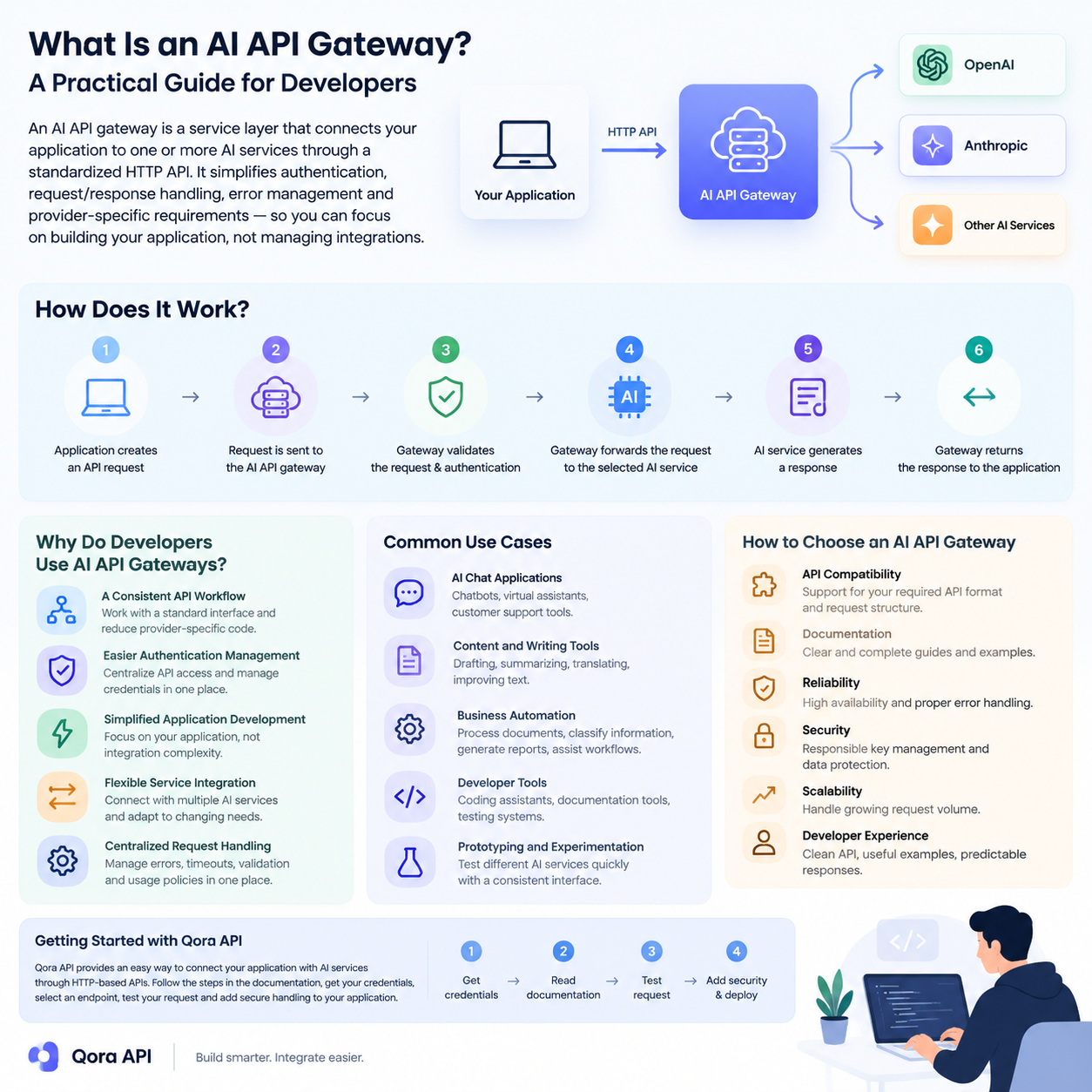
    An AI API gateway is a service layer that sits between your application and one or more AI providers. It exposes a single stable HTTP endpoint, then handles authentication, routing, retries, caching, and usage tracking on your behalf, so your code talks to one API instead of many.

    Artificial intelligence is becoming part of modern software, from customer support tools and content platforms to automation systems and developer applications. However, connecting an application to AI services can become complicated when developers need to manage authentication, API requests, responses, errors, and provider-specific requirements.

    An AI API gateway provides a simpler way to connect applications with AI services through a consistent HTTP API. This guide explains what an AI API gateway is, how it works, why developers use one, and what to consider when choosing an API gateway for an AI-powered application.

    What Is an AI API Gateway?

    An AI API gateway is a service layer that connects an application to one or more artificial intelligence services through a standardized API interface.

    Without an API gateway, an application may need to communicate with different AI providers using separate authentication methods, request formats, response structures, and error-handling systems. An AI API gateway can provide a more consistent development experience by placing a common interface between the application and the AI service.

    For developers, this means the frontend or backend application can use a predictable API workflow while the gateway manages the connection to the available AI services.

    An AI API gateway may be used for tasks such as:

    • Sending text-generation requests
    • Connecting software applications with language models
    • Managing API authentication
    • Processing AI responses
    • Handling request errors
    • Organizing access to AI-powered services

    The exact features depend on the gateway provider and its supported services. Some gateways are thin proxies; others add a control plane with routing, failover, caching, quotas, and cost attribution.

    How Does an AI API Gateway Work?

    The basic workflow of an AI API gateway is straightforward.

    First, an application sends an HTTP request to the gateway. The request usually contains authentication information, a selected model or service, and the required input data.

    The gateway then processes the request and forwards it to the appropriate AI service. After the AI service returns a response, the gateway sends the result back to the application.

    A typical workflow looks like this:

    1. The application creates an API request.
    2. The request is sent to the AI API gateway.
    3. The gateway validates the request and authentication details.
    4. The gateway forwards the request to the selected AI service.
    5. The AI service generates a response.
    6. The gateway returns the response to the application.

    This structure allows developers to keep their application logic organized while using a consistent communication method.

    Gateway architecture and the request lifecycle

    Think of a gateway as a pipeline, not a single hop: each request passes through stages that add reliability without touching application code.

    • Authentication and key resolution. Validate the caller, map it to a tenant, and inject provider credentials that never reach client code.
    • Policy checks. Rate limits, token budgets, allowed model lists, and content filters run before any provider is billed.
    • Routing. Select a target provider and model, then rewrite the request into that provider’s native format.
    • Upstream call and telemetry. Dispatch with a timeout, retry transient failures, and record latency, tokens, and cost against the calling key.

    Because these stages live outside your application, changing a provider becomes a configuration change rather than a deployment. That is why teams can switch AI providers without rewriting their code.

    Why Do Developers Use AI API Gateways?

    A Consistent API Workflow

    Different AI services may use different endpoints, parameters, and response formats. A gateway can help developers work with a more consistent interface, reducing the amount of provider-specific code inside the application.

    Easier Authentication Management

    API credentials should be handled carefully. Instead of placing multiple provider credentials throughout an application, developers can centralize API access through a gateway and manage authentication in one location.

    Simplified Application Development

    When the connection layer is standardized, developers can focus more on the application itself. This can be useful when building chat interfaces, automation tools, content applications, research systems, or internal business software.

    Flexible Service Integration

    A gateway can make it easier to connect an application with different AI services. This may help development teams test various services or adjust their architecture as project requirements change.

    Centralized Request Handling

    Applications may need consistent handling for errors, timeouts, request validation, and usage policies. A gateway provides a central location where these processes can be managed.

    Cost control and visibility

    Provider bills do not show which feature or customer consumed the budget. A gateway sees every request, so it can attribute spend per key and enforce ceilings before the invoice arrives. See how to reduce AI API costs.

    Gateway versus direct provider integration

    The trade-off is whether the operational surface you gain is worth one extra network hop.

    Dimension Direct provider integration AI API gateway
    API surface One SDK and schema per provider One canonical schema, many providers
    Credentials Provider keys scattered across services Single gateway key, providers hidden
    Failover Custom retry logic per integration Built-in retry and provider fallback
    Provider switch Code change and redeploy Configuration change
    Cost attribution Reconstructed from provider dashboards Measured per key or tenant
    Caching Implemented separately by each team Shared exact and semantic cache
    Latency Lowest possible Adds a small proxy hop

    Direct integration stays defensible with one provider, one team, and no cost pressure. Multiple providers, teams, or tenants tip the balance. See AI gateway versus API gateway.

    Routing strategies

    Routing is where a gateway earns its keep: you describe intent, and the gateway picks the target.

    • Weighted routing splits traffic by percentage, keeping a secondary provider warm and making migrations gradual.
    • Latency-based routing sends each request to the healthy provider with the lowest recent time to first token.
    • Cost-based routing prefers the cheapest provider that satisfies the request, often by sending simple prompts to smaller models.
    • Capability-based routing matches requests to models that support the required context length, modality, or schema enforcement.
    • Failover routing promotes a standby provider only when the primary fails.

    Most production systems combine capability routing to pick the model class, latency-based selection within it, and failover as the safety net. See how to choose the right AI model.

    Failover and retry

    Retries repeat a call against the same target after a short backoff; failover abandons that target for a different provider. Retries handle transient faults, while failover protects you when an entire provider has a bad hour. Classify errors before acting: authentication and schema errors never succeed on retry, while timeouts and server errors often do.

    import OpenAI from "openai";
    
    const client = new OpenAI({
      baseURL: process.env.GATEWAY_BASE_URL,
      apiKey: process.env.GATEWAY_API_KEY,
      maxRetries: 0,
    });
    
    const TARGETS = ["model-fast", "model-balanced", "model-cheap"];
    
    export async function chat(messages) {
      let lastError;
      for (const model of TARGETS) {
        try {
          const res = await client.chat.completions.create({ model, messages });
          return res.choices[0].message.content;
        } catch (err) {
          lastError = err;
          const status = err?.status;
          if (!status || status === 429 || status >= 500) continue;
          throw err;
        }
      }
      throw lastError;
    }
    

    A gateway that already implements this logic saves you from rebuilding it in every service. See building a multi-provider AI failover layer and handling 429 rate limit errors.

    Caching in front of the provider

    Much production traffic is repetitive. Exact caching keys on the full payload and suits deterministic prompts. Semantic caching keys on embedding similarity, so differently worded questions share one upstream call, at the cost of a threshold you must tune. Caching belongs at the gateway, the only layer that sees every caller. See prompt caching for repeated context.

    Observability and cost attribution

    A gateway is the natural instrumentation point for AI traffic. Capture time to first token, total latency, tokens, cache hits, provider, retry count, and final status; aggregated by key, those metrics answer questions provider dashboards cannot. Tagging requests with a tenant identifier also lets you roll spend up per customer. See LLM observability and metering and billing AI usage per user.

    Security considerations

    Concentrating provider access in one place improves security only if the gateway itself is defended.

    • Key management. Provider credentials live in the gateway’s secret store and never reach client applications; gateway keys should be scoped, rotatable, and revocable.
    • Rate limiting. Apply limits per key, per tenant, and globally, with separate budgets for expensive models, so a bug cannot become an unbounded bill.
    • Data handling. Decide whether prompts and completions are logged, for how long, and where, and redact personal data before it leaves your boundary.

    These controls are cheaper to configure once than to retrofit. See AI API security for a checklist.

    Build versus buy

    Count the features you need today and the maintenance they imply. Build when requirements are unusual, when data must stay inside your infrastructure, or when a thin proxy over one provider is enough. Buy when you need multi-provider routing, failover, caching, quotas, and per-tenant reporting, because that is a service with its own on-call rotation. Keep your application on an OpenAI-compatible interface either way, so the decision stays reversible: see the OpenAI-compatible API guide.

    Common Use Cases for AI API Gateways

    AI API gateways can support many types of software projects.

    AI Chat Applications

    Developers can use an AI API gateway as the connection layer for chatbots, virtual assistants, and customer support tools.

    Content and Writing Tools

    Applications for drafting, summarizing, translating, or improving text can communicate with AI services through a gateway instead of implementing separate integrations.

    Business Automation

    AI-powered automation systems may use a gateway to process documents, classify information, generate reports, or assist with internal workflows.

    Developer Tools

    AI API gateways can also support coding assistants, documentation tools, testing systems, and other developer-focused applications.

    Prototyping and Experimentation

    During early development, teams may want to test different AI services quickly. A consistent gateway interface can simplify experimentation and reduce repeated integration work.

    How to Choose an AI API Gateway

    Before choosing an AI API gateway, developers should evaluate several factors.

    API Compatibility

    Check whether the gateway supports the API format and request structure required by your application. Compatibility can reduce development time and make integration easier.

    Documentation

    Clear documentation is important for understanding authentication, endpoints, request parameters, response formats, and error messages.

    Reliability

    Review the gateway’s availability, response behavior, and error-handling process. Reliable access is especially important for applications used by customers or business teams.

    Security

    API keys and user data should be handled responsibly. Developers should review how authentication, data transmission, and access control are managed.

    Scalability

    Consider whether the gateway can support the expected request volume as the application grows. A solution that works for a small prototype may require additional features for production use.

    Developer Experience

    A clean API, useful examples, and predictable responses can make a significant difference during implementation and maintenance.

    Getting Started with Qora API

    Qora API provides an API-based way for developers to connect applications with AI services. Before integrating any API, developers should review the available documentation, authentication requirements, endpoint details, and supported request formats.

    A basic integration process generally includes the following steps:

    1. Create or obtain the required API credentials.
    2. Review the API documentation.
    3. Select the endpoint and service required by your application.
    4. Send a test request from your development environment.
    5. Check the response and error behavior.
    6. Add secure request handling to your application.
    7. Test the integration before using it in production.

    Developers should avoid exposing API keys in frontend code or public repositories. Credentials should be stored securely on the server side or in protected environment variables.

    Once the first request succeeds, make the integration observable before adding features: log latency and token usage, set a timeout, and decide what happens when a provider is slow. See how to integrate an AI API into your application.

    Frequently asked questions

    Is an AI API gateway the same as a traditional API gateway?

    No. A traditional API gateway manages generic HTTP concerns such as authentication, routing, and rate limiting. An AI API gateway adds model-aware behavior on top, including token accounting, streaming responses, provider failover, and prompt-aware caching.

    Does a gateway add noticeable latency?

    It adds one network hop, a small fraction of a generation request, because model inference dominates end-to-end latency. A gateway can also lower average latency by routing to the fastest healthy provider or serving a cached response.

    Can I use a gateway without changing my existing code?

    Often yes, if the gateway exposes an OpenAI-compatible endpoint. You typically change only the base URL and the API key, and existing SDK calls keep working. Provider-specific features outside that schema may still need adaptation.

    How does a gateway help with rate limits?

    It centralizes them. Instead of each service discovering a provider limit independently, the gateway queues, retries with backoff, or fails over when a limit is reached. It can also enforce quotas per key so one client cannot exhaust capacity for everyone.

    What should I measure first?

    Start with time to first token, total latency, token counts, error rate by status code, and cost per key. Those five metrics explain most production incidents and most of a monthly bill.

    Conclusion

    An AI API gateway can simplify the process of connecting applications with artificial intelligence services. By providing a consistent API workflow, centralized authentication, and a structured integration layer, it can help developers build and maintain AI-powered applications more efficiently.

    When selecting an AI API gateway, pay attention to compatibility, documentation, security, reliability, scalability, and overall developer experience. With the right API structure, developers can spend less time managing integrations and more time creating useful software products.

    Qora API offers a practical starting point for developers who want to explore AI API integration and build applications around HTTP-based AI services. You can review the platform at qoraapi.com.

    More guides in the AI API series

    Continue building your AI API stack: How to Reduce AI API Costs: A Practical Guide for Developers · AI API Streaming Explained: How SSE Works and How to Consume It · How to Build an AI Chatbot with the API · Top 10 Real-World Use Cases for an AI API in 2026.