Tag: AI Integration

  • OpenAI-Compatible API: One Key for GPT, Claude & Gemini

    OpenAI-Compatible API: One Key for GPT, Claude & Gemini

    An OpenAI-compatible API is any HTTP endpoint that accepts the same /v1/chat/completions request format, JSON schema, and authentication pattern used by OpenAI, so the official OpenAI SDKs (Python, Node.js, Go, .NET, Java, curl, and the community ecosystem around them) can be pointed at it by changing only one line: the base_url. The response is the same JSON shape, the streaming protocol is the same Server-Sent Events format, and the model is selected by a string you pass in the request body. This is what allows a single piece of client code to talk to OpenAI’s own servers, to a private Azure deployment, to Anthropic Claude routed through an aggregator, to Google Gemini, to open-source models, or to a relay such as Qora API — with zero changes to your application logic.

    This guide explains what an OpenAI-compatible API is in practice, how it works under the hood, and why it has become the de-facto interface for modern AI integrations. It also shows the exact code you need to start sending requests today, and how to use the same key to call GPT, Claude, and Gemini through one endpoint.

    What is an OpenAI-compatible API?

    An OpenAI-compatible API is an endpoint that mimics OpenAI’s public HTTP interface. The most common surface is the Chat Completions endpoint:

    POST https://<your-provider>/v1/chat/completions
    Content-Type: application/json
    Authorization: Bearer YOUR_API_KEY
    
    {
      "model": "gpt-4o",
      "messages": [
        {"role": "system", "content": "You are a helpful assistant."},
        {"role": "user", "content": "Summarise this document in 3 bullets."}
      ],
      "temperature": 0.3,
      "stream": false
    }

    Any service that returns a response in the same shape as OpenAI’s /v1/chat/completions is “OpenAI-compatible”. The OpenAI SDKs are designed to work against this contract, so an OpenAI-compatible endpoint can be used with the official SDKs, with LangChain, with LlamaIndex, with Cursor, with Continue.dev, with countless internal tools, and with simple curl commands — without modifying the client.

    Providers that typically expose an OpenAI-compatible API include OpenAI itself, Azure OpenAI (with /openai/deployments/<name>), Together AI, Groq, Fireworks, DeepSeek, OpenRouter, and AI-relay / aggregation platforms such as Qora API. Each provider usually accepts a different set of model names — for example gpt-4o, claude-3-5-sonnet, gemini-1.5-pro, or vendor-specific aliases — but the request envelope, authentication header, and response JSON are identical.

    Why an OpenAI-compatible API matters

    For developers and teams shipping AI features, the OpenAI-compatible contract is the closest thing the industry has to a standard interface for LLMs. There are several practical reasons it has become so widely adopted:

    1. SDK portability. The official OpenAI libraries for Python, JavaScript, Go, Java, and .NET work out of the box against any compatible endpoint. You can keep using the same client object, retry logic, and tooling across providers.
    2. No vendor lock-in. Switching from one provider to another becomes a configuration change rather than a rewrite. If a model is deprecated, prices change, or latency worsens on one provider, you can move the same workload elsewhere in minutes.
    3. Multi-model workflows. Different models are better at different tasks. Coding assistants often perform better with Claude, structured extraction with GPT, and long-context summarisation with Gemini. An OpenAI-compatible gateway lets you route different parts of the same product to different models — and benchmark them in production.
    4. Unified billing and keys. Instead of managing a separate account, key, and invoice for each upstream provider, you can manage one key and one balance against an aggregator that speaks the OpenAI protocol.
    5. Regional and access considerations. Many teams need to access models from locations or accounts where direct upstream access is not available. A relay that exposes the OpenAI protocol removes this friction without changing how the client is written.

    How an OpenAI-compatible API works

    From a developer’s point of view the flow is straightforward. Your application sends a Chat Completions request to a single URL, identifies itself with a Bearer token, and names the model it wants. The provider authenticates the request, looks up the model in its routing table, forwards the request to the correct upstream (OpenAI, Anthropic, Google, an open-source host, or its own inference stack), and returns the result in the same JSON envelope OpenAI uses.

    The diagram below summarises the flow. The application on the left never needs to know which provider is on the other side — it only knows the base_url and a model name.
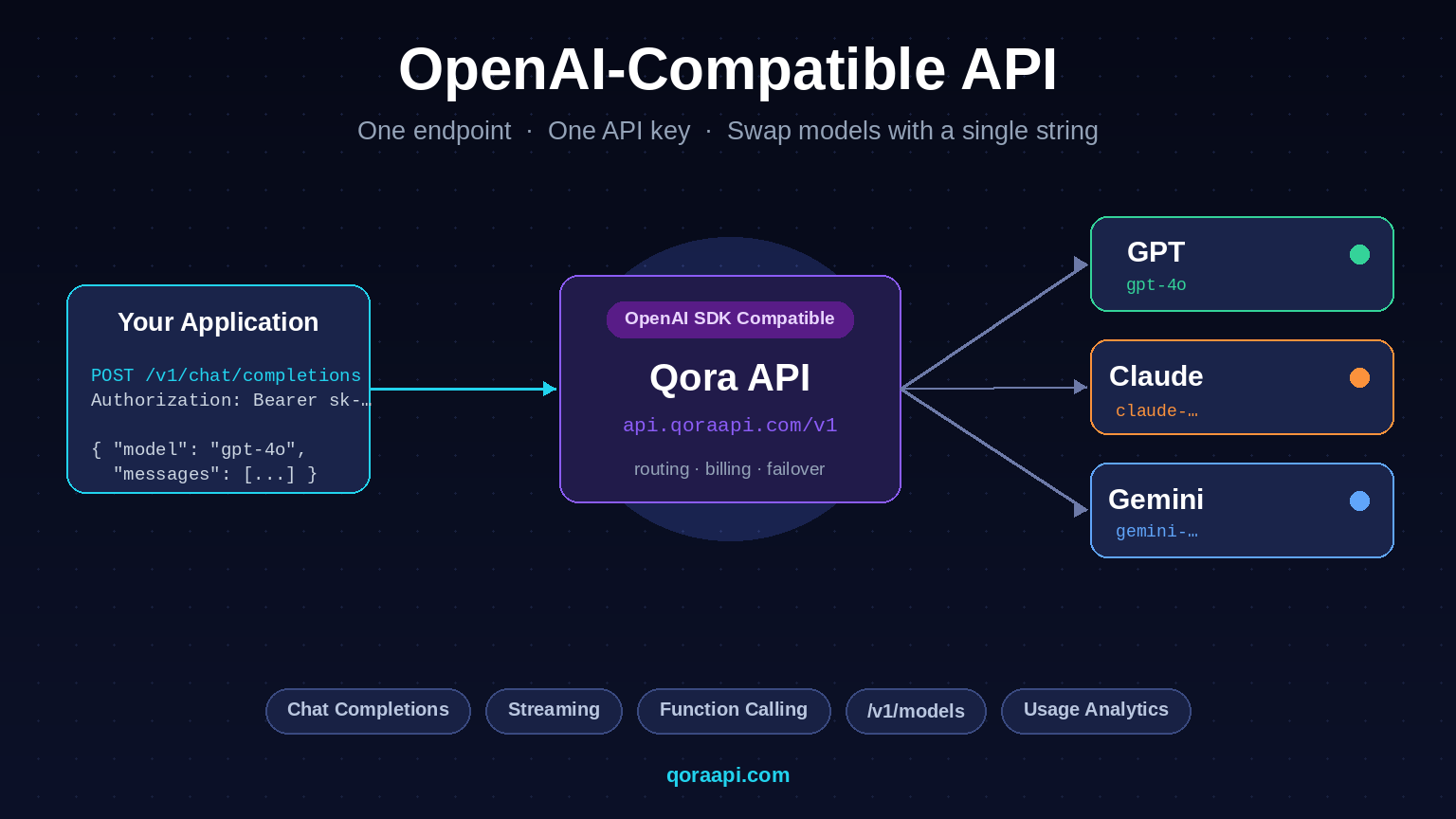
    Diagram of an OpenAI-compatible API routing one request from a developer application through a unified endpoint to GPT, Claude, and Gemini.

    For a deeper explanation of the broader category, see our guide on what an AI API gateway is, and the practical steps to integrate an AI API into a real application.

    One endpoint for GPT, Claude and Gemini

    The most useful feature of an OpenAI-compatible API is that the same code path can call multiple models. You choose the model per request — or per feature in your product — without redeploying anything. The table below shows what an OpenAI-compatible payload looks like across the three most popular model families.

    Model familyExample model stringBest for
    OpenAI GPTgpt-4o, gpt-4o-mini, o1-miniGeneral reasoning, tool use, structured output
    Anthropic Claudeclaude-3-5-sonnet, claude-3-haikuLong-form writing, nuanced instruction following, code review
    Google Geminigemini-1.5-pro, gemini-1.5-flashLong context, multimodal input, fast and cheap responses

    Behind the scenes, an aggregator translates the OpenAI-shaped payload into the format each upstream provider expects (Anthropic’s /v1/messages and Google’s generateContent both use different request and response shapes), runs the call, and normalises the answer back to the OpenAI shape your client expects. Your application sees one consistent response no matter which model answered.

    Code examples you can paste today

    These three snippets are identical in structure — the only thing that changes between providers is base_url and the model string. Replace the placeholder with a key from any OpenAI-compatible provider (here we use Qora API as the example) and the same code calls GPT, Claude, or Gemini.

    cURL

    curl https://api.qoraapi.com/v1/chat/completions \
      -H "Authorization: Bearer $QORA_API_KEY" \
      -H "Content-Type: application/json" \
      -d '{
        "model": "gpt-4o",
        "messages": [
          {"role": "user", "content": "Explain OpenAI-compatible APIs in one paragraph."}
        ]
      }'

    Python (official OpenAI SDK)

    from openai import OpenAI
    
    client = OpenAI(
        base_url="https://api.qoraapi.com/v1",   # <-- the only line that changes
        api_key="YOUR_API_KEY",
    )
    
    resp = client.chat.completions.create(
        model="claude-3-5-sonnet",                # <-- swap to gpt-4o or gemini-1.5-pro
        messages=[
            {"role": "system", "content": "You are a concise technical writer."},
            {"role": "user", "content": "Summarise what an OpenAI-compatible API is."},
        ],
    )
    print(resp.choices[0].message.content)

    Node.js (official OpenAI SDK)

    import OpenAI from "openai";
    
    const client = new OpenAI({
      baseURL: "https://api.qoraapi.com/v1",     // <-- the only line that changes
      apiKey: process.env.QORA_API_KEY,
    });
    
    const completion = await client.chat.completions.create({
      model: "gemini-1.5-pro",                    // <-- swap to any supported model
      messages: [
        { role: "user", content: "Give me 3 use cases for an AI API gateway." },
      ],
    });
    
    console.log(completion.choices[0].message.content);

    The same pattern works in LangChain (ChatOpenAI(base_url=...)), LlamaIndex, and the Cursor / Continue VS Code extensions. If your tool already speaks OpenAI, you can switch the underlying model by changing two values: the base URL and the model name.

    How to pick an OpenAI-compatible provider

    Not every “compatible” provider is identical. When you evaluate one, look at these criteria:

    • Model coverage. Does it expose the models you actually want (GPT, Claude, Gemini, plus open-source)? Are model names documented and stable?
    • Feature parity. Does it support streaming, function calling, JSON mode, vision input, and system messages? Some providers silently drop advanced features.
    • Latency and uptime. An extra hop adds network time. Look for providers that operate in regions close to you and publish transparent status pages.
    • Pricing transparency. Pricing should be predictable and ideally marked up at a clear, fixed rate over upstream cost. Hidden fees or credit systems make cost forecasting hard.
    • Key and account management. Can you create separate keys per environment (dev / staging / prod)? Can you set usage limits and rotate keys?
    • Compatibility. Some providers limit request sizes or strip certain fields. Always run a smoke test of your real production payload before committing.

    Our detailed walkthrough of how to choose the best AI API gateway expands each of these points and compares the leading options.

    Get started with Qora API in two minutes

    Qora API is a developer-focused AI API gateway built around the OpenAI protocol. It exposes a single https://api.qoraapi.com/v1 endpoint that lets you call GPT, Claude, and Gemini models with the same key and the same code path you would use against OpenAI directly.

    1. Sign up at qoraapi.com and top up a small balance to cover your first tests.
    2. Create an API key in the dashboard and store it as an environment variable (for example QORA_API_KEY).
    3. Point the OpenAI SDK at https://api.qoraapi.com/v1, pick any supported model name, and send a request.
    4. Track usage, latency, and per-key spend directly in the dashboard.

    Because the interface is identical to OpenAI’s, you can keep your existing client code, your retry logic, your LangChain setup, and your CI tests — only the base endpoint and the model string change. To go deeper into the implementation side, read our guide to integrating an AI API into your application.

    Frequently asked questions

    What does “OpenAI-compatible” actually mean?

    It means the service accepts HTTP requests in the same format OpenAI uses — typically /v1/chat/completions and /v1/models — with the same JSON body, the same Authorization: Bearer <key> header, and the same response envelope. The official OpenAI SDKs and most third-party tools can point at it just by changing base_url.

    Can I use the same API key for GPT, Claude and Gemini?

    Yes, when the key is issued by an OpenAI-compatible aggregator that has access to all three providers. The same key authenticates requests for any model the gateway routes, and you select the model per request by changing the model field in the JSON body.

    Do I need to rewrite my code to switch providers?

    No. The only change most clients need is the base_url (or apiBase / api_base, depending on the SDK) and the model name. Everything else — message format, streaming, function calling, retries — works without modification.

    Do OpenAI-compatible APIs support streaming and function calling?

    Most well-built providers do, but feature coverage varies. Before adopting a provider, verify that it supports the exact features you depend on: server-sent event streaming, JSON mode, tool/function calling, vision inputs, and long context windows. Reputable providers document these explicitly.

    Is an OpenAI-compatible API the same as an AI API gateway?

    An OpenAI-compatible API is the contract the gateway exposes; an AI API gateway is the broader product that sits between your application and many upstream model providers. A gateway can be OpenAI-compatible (and most modern ones are), but the gateway also handles authentication, billing, rate limits, and routing, while “OpenAI-compatible API” only describes the wire format.

    Is using an OpenAI-compatible relay more expensive than calling providers directly?

    It depends on the relay. Some add a markup on top of upstream cost, others pool volume to negotiate lower rates than a single account can get, and a few expose upstream cost directly. Always check the published price per million tokens for each model before deciding.


    An OpenAI-compatible API turns the OpenAI SDK into a universal client for the entire AI ecosystem. Once your application talks this protocol, you can route any feature in your product to GPT, Claude, or Gemini without touching application code, switch providers in minutes, and consolidate keys and billing into a single account. If you are ready to try it, create a key at qoraapi.com and point your existing OpenAI client at https://api.qoraapi.com/v1.

    More guides in the AI API series

    Continue building your AI API stack: AI Function Calling Explained: Tools, JSON Schema, and the Tool-Use Loop · How to Switch AI Providers Without Rewriting Your Code · Multimodal AI APIs: Working with Vision and Audio.

  • Ultimate Guide: How to Choose the Best AI API Gateway in 2026

    Ultimate Guide: How to Choose the Best AI API Gateway in 2026

    Short answer: the best AI API gateway in 2026 is the one that speaks the OpenAI protocol natively, adds well under 50 ms of routing overhead, fails over across at least three providers without application changes, and attributes every token of spend to a specific key or team.

    As AI continues to reshape software development, choosing an AI API gateway has become a critical decision for developers and businesses. The gateway is the central hub for managing, routing and securing API calls to multiple AI services, streamlining integration and reducing complexity.

    What is an AI API Gateway?

    An AI gateway is a specialized server that acts as an intermediary between your applications and multiple AI service providers. It provides a unified interface for accessing different AI capabilities, from natural language processing to image generation, through a single, consistent API.

    Key benefits of using this technology include:

    • Unified Interface: Access multiple AI providers through one API
    • Cost Optimization: Route requests to the most cost-effective provider
    • Reliability: Automatic failover when a provider experiences downtime
    • Security: Centralized authentication and rate limiting
    • Monitoring: Track usage, costs, and performance across all providers

    An AI gateway is not a traditional API gateway with a language-model plugin bolted on. Traditional gateways assume short, stateless calls measured in milliseconds. LLM traffic streams for tens of seconds, bills by token, and depends on upstream providers that rate-limit without warning. See AI Gateway vs API Gateway: Key Differences and When to Use Each.

    How to Run a Gateway Evaluation

    Most teams pick a gateway from a landing page, which is how an undebuggable component ends up in the critical path. A two-week bake-off is far more reliable.

    The three architectural options

    Decide which shape you want before scoring vendors. Their cost and risk profiles differ fundamentally.

    Criterion Direct provider integration Self-hosted gateway Managed relay
    Protocol compatibility One SDK per provider You build the compatibility layer OpenAI-compatible out of the box
    Model coverage Whatever you integrate Whatever you configure Broad, operator-maintained
    Latency overhead None Low, depends on region One extra network hop
    Failover Custom retry per provider You build the health checks Built in, often multi-region
    Observability Split across dashboards Full control, you own it Unified logs and cost views
    Pricing model List price only List price plus infrastructure and on-call List price plus a routing margin
    Compliance Depends on each provider Strongest: data stays in your network Depends on operator certifications

    The two-week plan

    Rate each option from 1 to 5, then weight for your context. Fix the weights before any demo, or they bend toward whichever tool demoed best.

    1. Days 1 to 2: replay 500+ frozen production prompts through each candidate.
    2. Days 3 to 4: measure time to first token at the 50th, 95th and 99th percentiles.
    3. Days 5 to 6: inject failures. Kill a provider mid-stream and confirm silent recovery.
    4. Days 10 to 11: audit logs. Can you reconstruct key, token count and cost from three days ago?
    5. Days 12 to 14: rehearse the exit and time how long rollback takes.

    For routing-specific methodology, see How to Choose the Right AI Model: A Practical Model-Routing Guide.

    Key Features to Look For

    1. Multi-Provider Support

    The best solutions support multiple providers including OpenAI, Anthropic, Google AI, Cohere and open-source models. This prevents vendor lock-in and lets you match models to tasks, so check how quickly new models appear after launch.

    2. Intelligent Routing

    Advanced solutions route requests automatically based on cost, speed, model capabilities or availability, ensuring optimal performance without manual intervention. Look for rules you can express declaratively and override per request.

    3. Comprehensive Security

    Look for API key management, rate limiting, request validation and encryption. Upstream provider keys should never reach your application code.

    4. Usage Analytics

    Analytics reveal usage patterns, costs and bottlenecks. The minimum standard is per-request records carrying token counts, latency, model, provider and a customer identifier you control.

    5. Streaming Fidelity

    A gateway that buffers streamed responses destroys a chat interface. Verify that server-sent events pass through incrementally and that client cancellation propagates upstream.

    Protocol and SDK Compatibility

    Compatibility determines how expensive the gateway is to adopt. An OpenAI-compatible endpoint means your existing SDK, retry logic and test fixtures keep working.

    Check these before committing:

    • Request and response shape: do tool calls, structured JSON outputs and multimodal blocks survive the round trip unchanged?
    • Streaming semantics: are chunk boundaries and the terminal sentinel preserved, or does the gateway rewrite the event stream?
    • Error codes: are upstream status codes passed through faithfully, or flattened into a generic 500?
    • Header passthrough: can you attach custom metadata that appears in logs and cost reports?
    • Non-chat endpoints: embeddings, speech, transcription and image generation are often forgotten.

    The payoff is that switching providers becomes a configuration change rather than a refactor, as argued in How to Switch AI Providers Without Rewriting Your Code and OpenAI-Compatible API: One Key for GPT, Claude and Gemini.

    Latency and Throughput Overhead

    A gateway sits in the hot path of every request, so its overhead is a permanent tax. For LLM workloads that tax is usually negligible relative to inference time: a routing decision plus one extra hop typically adds single-digit to low-double-digit milliseconds, while a completion takes seconds.

    What actually hurts is two failure modes. Buffering, where the gateway waits for a full response before forwarding it, turns time to first token from hundreds of milliseconds into the whole completion time. Connection churn, opening a fresh TLS handshake on every call, adds a round trip per request.

    Measure overhead as a delta: run the same prompt directly and through the gateway, compare the 95th percentile of time to first token, and express it as a percentage of end-to-end latency. Anything under roughly five percent is invisible to users, a discipline shared with LLM Observability: Monitoring AI API Usage, Latency and Cost.

    Failover and Reliability Guarantees

    Failover is where a managed gateway earns its margin. Provider outages, regional capacity crunches and per-key rate limits are routine, and the gateway should absorb them without users noticing.

    Evaluate failover on four axes: how failures are detected, how fast a provider leaves rotation, whether retries are safe, and how a request that already streamed partial output is handled. That last one matters most, because once the first token reaches the browser you cannot silently retry. Health checks must be active, not passive. A probe you can run yourself looks like this:

    import os, time, httpx
    
    def probe(model):
        t0 = time.perf_counter()
        r = httpx.post(
            f"{os.environ['GATEWAY_BASE_URL']}/chat/completions",
            headers={"Authorization": f"Bearer {os.environ['GATEWAY_KEY']}"},
            json={"model": model,
                  "messages": [{"role": "user", "content": "ping"}],
                  "max_tokens": 1},
            timeout=10.0,
        )
        return {"model": model, "ok": r.status_code == 200,
                "latency_ms": round((time.perf_counter() - t0) * 1000, 1)}
    

    Run that on a schedule from the same region as your application and alert on two consecutive failures. It gives you a signal independent of the gateway’s own dashboard, which is what you want when the gateway is the suspect. Redundancy patterns are covered in How to Build a Multi-Provider AI Failover Layer for 99.9% Uptime.

    Observability and Cost Attribution

    If you cannot answer “which customer generated this spend” in under a minute, the gateway is not finished. Every request record should carry a timestamp, the calling key, the resolved model and provider, token counts, time to first token, total latency and status code.

    Also test budgets and quotas per key, so a runaway integration cannot consume the month’s allowance before anyone notices, and confirm you can export raw records to your own warehouse for reconciliation.

    Security, Key Management and Compliance

    Centralised credential handling is the strongest security argument for a gateway. Provider keys live in one place instead of being copied into every service, CI job and laptop, and applications authenticate with scoped virtual keys you can rotate, revoke and rate-limit individually.

    Ask these during evaluation:

    • Where are upstream credentials stored, and how are they encrypted at rest?
    • Can a virtual key be scoped to specific models, budgets and expiry dates?
    • Is prompt content logged, and can that logging be disabled per key?
    • What certifications does the operator hold, and do the data flows match your obligations?

    Content logging deserves particular attention. Logging prompts is invaluable for debugging, but it creates a new store of customer data, which can change your compliance posture overnight. Decide deliberately, per environment. Key hygiene is covered in AI API Security: Protecting Keys and Preventing Abuse.

    Common Use Cases

    For Startups

    Startups can experiment with different providers without committing to a single vendor, prototyping quickly while keeping the flexibility to switch as needs evolve.

    For Enterprise

    Large organizations use these gateways to standardize AI access across teams, enforce governance policies, manage costs centrally, and ensure compliance with data handling regulations.

    For SaaS Products

    SaaS companies add intelligent features without managing multiple provider integrations, and gain per-tenant attribution so AI usage can be metered or billed. See Metering and Billing AI Usage Per User: A Practical SaaS Guide.

    Implementation Best Practices

    When implementing your solution, consider these best practices:

    1. Start Small: Begin with one or two use cases before expanding
    2. Monitor Closely: Track performance metrics and costs from day one
    3. Plan for Scale: Ensure your gateway can handle traffic growth
    4. Implement Fallbacks: Design graceful degradation when services are unavailable
    5. Cache When Possible: Reduce costs and latency by caching repeated requests
    6. Version Your Prompts: Treat prompt changes as deployments with their own review and rollback

    Migration Path and Rollback

    Adopting a gateway should be a small change, and if it is not, that is itself a signal. The cleanest migration keeps your existing SDK and changes only the base URL and the key.

    from openai import OpenAI
    import os
    
    client = OpenAI(
        api_key=os.environ["GATEWAY_KEY"],
        base_url=os.environ["GATEWAY_BASE_URL"],
    )
    

    Two environment variables, no import changes, no call-site rewrites. Roll out by routing a small percentage of traffic first and keep the direct provider configuration in place, so rollback is a variable change rather than a code revert.

    Cost Considerations and TCO

    AI API costs can quickly add up. A good gateway helps control expenses through:

    • Intelligent provider selection based on pricing
    • Request caching to avoid duplicate calls
    • Rate limiting to prevent runaway usage
    • Detailed cost tracking and budgeting alerts

    Compare total cost of ownership rather than sticker price. The model has four parts: inference spend, gateway cost, engineering time and incident cost. Self-hosting looks cheapest on the first line and most expensive on the last two, because someone must own upgrades, scaling and the pager. A managed relay adds a margin on inference but can remove an entire on-call rotation.

    Express the comparison in relative terms. If routing rules move a meaningful share of simple traffic to a cheaper model tier, the saving usually exceeds the gateway’s own overhead by a wide margin. Concrete techniques are in How to Reduce AI API Costs: A Practical Guide for Developers.

    Common Selection Mistakes

    • Choosing on price alone. The cheapest routing margin is worthless if the gateway buffers streams or drops tool calls.
    • Skipping the failure drill. A failover path that has never been exercised is a hypothesis, not a guarantee.
    • No exit plan. If leaving requires a refactor, you have replaced one lock-in with another.

    The space is evolving rapidly. Emerging trends include:

    • Edge Deployment: Running smaller models closer to users for lower latency
    • Hybrid Models: Combining cloud and on-premise AI for sensitive workloads
    • Agent-Aware Routing: Gateways that understand multi-step tool-use sessions rather than isolated calls

    Frequently asked questions

    Do I need a gateway for a single-provider application?

    Not immediately, but the case strengthens quickly. The moment you add a second environment, team or model, centralised key management and per-key budgets pay for themselves.

    Does adding a gateway meaningfully increase latency?

    For typical LLM workloads, no. A routing decision and one extra hop add a low single-digit percentage of end-to-end completion time. The real risks are buffered streaming and connection churn, so test time to first token at the 95th percentile.

    Is self-hosting cheaper than a managed relay?

    It depends on how you value engineering time. Self-hosting removes the routing margin and maximises data control, but you own upgrades, scaling, monitoring and incident response. Teams without dedicated platform engineers usually find the fully loaded cost exceeds a managed margin once on-call time is counted.

    How do I avoid vendor lock-in?

    Insist on an OpenAI-compatible interface, keep prompt content and routing configuration in your own repository, and rehearse rollback before you need it. If reverting to direct provider calls is a two-variable change, you have not traded one lock-in for another.

    Should the gateway log full prompts and completions?

    That is a compliance decision, not a technical one. Logging content makes debugging easier, but it creates a new store of potentially sensitive data. Decide per environment, default to off in production unless you have a clear retention policy, and make the setting per key.

    Conclusion

    Choosing the right AI API gateway is essential for building robust, scalable, and cost-effective AI-powered applications. By providing unified access to multiple AI providers, intelligent routing, comprehensive security, and detailed analytics, a quality solution becomes an indispensable tool in your infrastructure.

    Whether you are a startup experimenting with AI or an enterprise standardizing access across teams, investing time in selecting the right gateway will pay dividends in development speed, operational efficiency, and cost optimization. Score the options against a written rubric, run the failure drills, and confirm the exit path before you commit. A managed relay such as qoraapi.com is a reasonable default for teams that want OpenAI-compatible access to many models without operating the routing layer themselves.

    More guides in the AI API series

    Continue building your AI API stack: How to Handle AI API Rate Limits and 429 Errors · AI Embeddings Explained: Vectors, Similarity, and Building Your First RAG · AI API Security: Protecting Keys and Preventing Abuse · LLM Observability: Monitoring AI API Usage, Latency and Cost.