
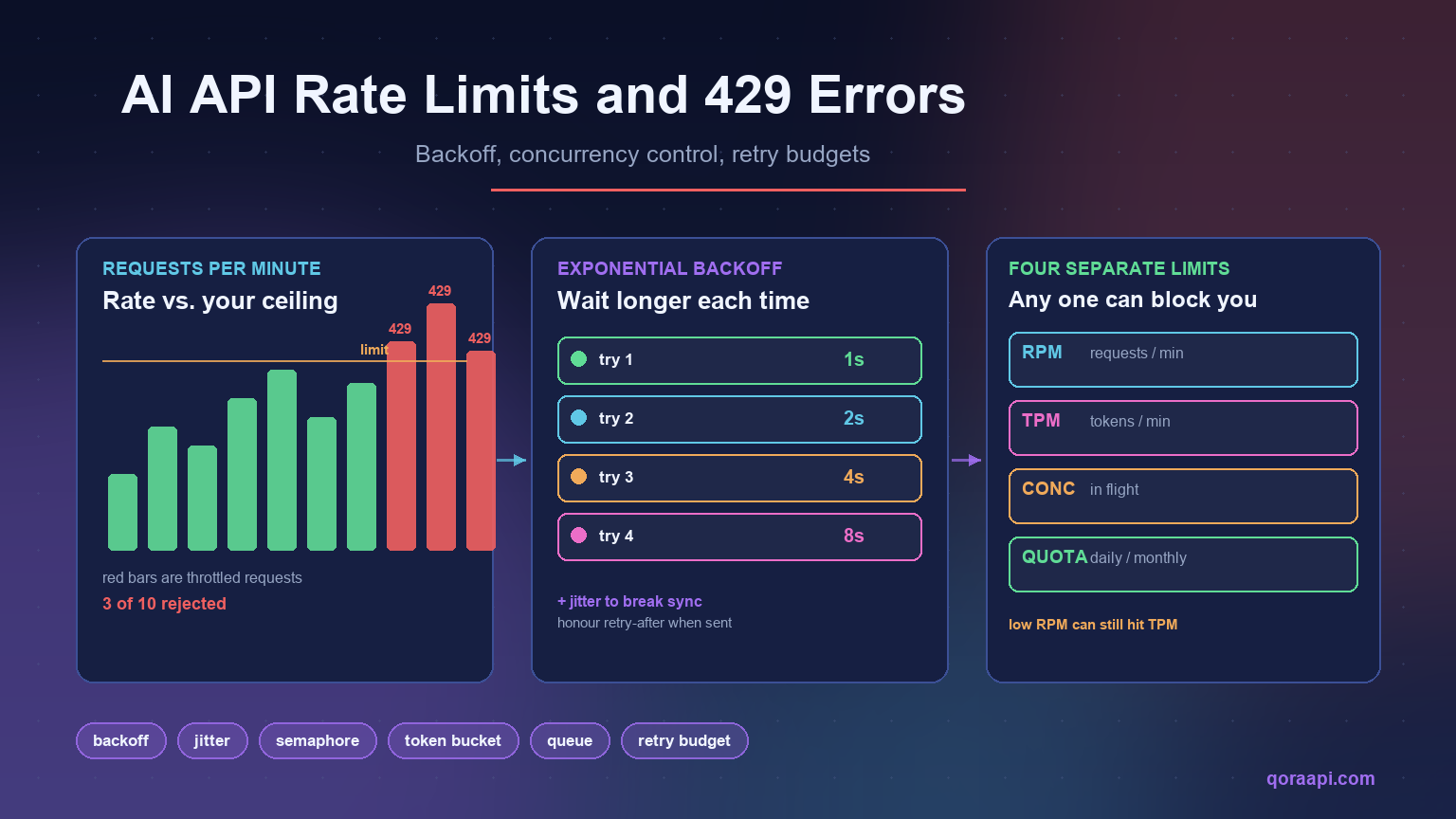
A 429 error from an AI API means you sent requests faster than your account is allowed to. In practice it is caused by one of three things: you exceeded a per-minute request or token limit, you exceeded the number of simultaneous connections, or you ran out of a daily or monthly quota. The fix is not to retry faster — it is to back off, cap concurrency, and queue the work that cannot be done immediately.
This guide explains how AI API rate limits actually work, how to read the headers that tell you exactly which limit you hit, and the five changes that stop 429s from reaching your users. Every code sample is production-shaped rather than illustrative, because the difference between “retry in a loop” and “retry with a budget” is the difference between a brief slowdown and a cascading outage.
What an AI API rate limit actually is
AI providers rate limit because inference is expensive and capacity is finite. A large model running on a GPU cluster cannot serve unlimited concurrent requests, so providers allocate each account a slice of that capacity and enforce it at the edge. The limit is a fairness and stability mechanism, not a punishment — and it is why retrying immediately after a 429 usually produces another 429.
What makes AI APIs different from ordinary REST APIs is that requests are not equal. A request with 200 tokens and a request with 120,000 tokens draw on very different amounts of capacity, so AI providers meter multiple dimensions at once rather than counting requests alone.
The four limits you are actually subject to
Most AI API accounts are governed by four independent ceilings. Hitting any one of them produces a 429, and the confusing part is that you can be well under three while being blocked by the fourth.
| Limit | What it counts | Typical failure pattern |
|---|---|---|
| RPM — requests per minute | Number of API calls | Bursty traffic, fan-out loops, parallel workers |
| TPM — tokens per minute | Input + output tokens combined | Long prompts or large documents, even at low request volume |
| Concurrency | Simultaneous in-flight requests | Async workers or thread pools without a semaphore |
| Quota — daily / monthly | Total spend or total tokens | Batch jobs, runaway loops, unbounded agent runs |
The pattern worth internalising: a low request rate can still hit a token limit. Ten requests per minute is unremarkable until each one carries a 100,000-token context window, at which point you are consuming a million tokens per minute and being throttled despite a modest request count. When a 429 makes no sense at your request volume, look at tokens.
Read the headers before you guess
Almost every provider returns rate limit information in the response headers. Reading them tells you which ceiling you hit and how long to wait — which is strictly better than guessing a sleep duration.
| Header | Meaning |
|---|---|
x-ratelimit-limit-requests | Your request ceiling for the window |
x-ratelimit-remaining-requests | Requests left before you are throttled |
x-ratelimit-reset-requests | When the request window resets |
x-ratelimit-limit-tokens | Your token ceiling for the window |
x-ratelimit-remaining-tokens | Tokens left before you are throttled |
retry-after | Seconds to wait — returned with a 429 |
Header names vary by provider, so treat these as a pattern to look for rather than a fixed contract. The important habit is to log the whole header set on the first few 429s you see in a new integration — it takes one incident to learn your real ceiling, and it removes the guesswork permanently.
Fix 1: Exponential backoff with jitter
The first fix is the one everybody knows and half of everybody implements wrong. Retrying immediately after a 429 wastes the request and usually gets throttled again. Waiting a fixed two seconds works until enough workers do it simultaneously, at which point they all retry in lockstep and re-trigger the limit.
Exponential backoff solves the first problem; jitter solves the second. Adding randomness spreads retries across time so a fleet of workers does not synchronise into a thundering herd.
import random, time, logging

log = logging.getLogger(__name__)

def with_backoff(fn, attempts=5, base=1.0, cap=60.0):
    """Call fn(), retrying on throttling with exponential backoff + jitter."""
    for i in range(attempts):
        try:
            return fn()
        except Exception as e:                      # noqa: BLE001
            status = getattr(e, "status_code", None)
            retryable = status in (429, 500, 502, 503, 504)

            if not retryable or i == attempts - 1:
                raise

            # Prefer the server's own advice when it gives it.
            wait = getattr(e, "retry_after", None)
            if wait is None:
                wait = min(cap, base * (2 ** i))    # exponential growth
                wait += random.uniform(0, wait * 0.1)  # jitter
            else:
                wait = float(wait) + random.uniform(0, 0.5)

            log.warning("throttled (attempt %s/%s), sleeping %.1fs", i + 1, attempts, wait)
            time.sleep(wait)
Two details matter more than the formula. First, honour retry-after when the provider sends it — it is authoritative and shorter than your guess. Second, cap the wait; uncapped exponential growth turns a brief throttle into a request that hangs for minutes.
Fix 2: Cap concurrency, not just rate
Backoff handles the requests that fail. It does nothing about volume, because a system that fires 200 parallel requests will keep hitting the ceiling no matter how politely it retries. The durable fix is to limit how many requests are in flight at once.
import asyncio

async def gather_limited(jobs, limit=8):
    """Run jobs with at most `limit` requests in flight at once."""
    sem = asyncio.Semaphore(limit)

    async def run(job):
        async with sem:
            return await job

    return await asyncio.gather(*(run(j) for j in jobs))

# In synchronous code the same idea is a thread pool with a bounded size:
from concurrent.futures import ThreadPoolExecutor

with ThreadPoolExecutor(max_workers=8) as pool:
    results = list(pool.map(call_api, items))
A concurrency cap converts an unpredictable failure mode into predictable latency. Instead of some requests failing and others succeeding, everything succeeds slightly slower — which is almost always what users prefer.
Fix 3: Give retries a budget
Retries are not free. In AI APIs a retried request is billed again, so an aggressive retry policy can silently multiply your bill while making the outage worse. Two rules keep retries honest:
- Cap attempts. Three to five is enough. If a request has not succeeded by then, something is wrong upstream and more attempts will not fix it.
- Cap the global retry rate. If more than a small fraction of your traffic is retries, stop retrying and shed load. Retry storms are a common way a partial outage becomes a total one.
import time, threading

class RetryBudget:
    """Allow retries only while they stay a small share of traffic."""

    def __init__(self, ratio=0.2, window=10.0):
        self.ratio, self.window = ratio, window
        self._lock = threading.Lock()
        self._reset = time.time()
        self._total = self._retries = 0

    def _roll(self):
        now = time.time()
        if now - self._reset >= self.window:
            self._reset, self._total, self._retries = now, 0, 0

    def allow_retry(self):
        with self._lock:
            self._roll()
            self._total += 1
            if self._retries / max(self._total, 1) >= self.ratio:
                return False
            self._retries += 1
            return True
This is also where reducing AI API costs and reliability meet: the same retry discipline that prevents an outage also prevents paying twice for work you already attempted.
Fix 4: Throttle on the client side
Depending on the server to tell you to slow down means you are already being throttled. A token bucket lets you pace yourself at or just under your known limit, so you rarely see a 429 at all.
import time, threading

class TokenBucket:
    """Simple client-side rate limiter: `rate` permits per second."""

    def __init__(self, rate, capacity):
        self.rate, self.capacity = rate, capacity
        self.tokens = capacity
        self.updated = time.monotonic()
        self._lock = threading.Lock()

    def acquire(self, tokens=1):
        while True:
            with self._lock:
                now = time.monotonic()
                self.tokens = min(
                    self.capacity,
                    self.tokens + (now - self.updated) * self.rate,
                )
                self.updated = now
                if self.tokens >= tokens:
                    self.tokens -= tokens
                    return
                deficit = tokens - self.tokens
            time.sleep(deficit / self.rate)   # sleep outside the lock
Set the rate slightly below your actual ceiling. Running at 90% of your limit with zero 429s is better than running at 100% and spending engineering time on retries — and it gives you headroom for traffic spikes.
Fix 5: Queue what does not need to be instant
Most AI workloads contain a mix of interactive and background work, and only the interactive half has a latency budget. Pushing the rest through a queue smooths your traffic into a steady rate that sits comfortably under the limit.
- Interactive (chat, autocomplete, agent steps): keep on the real-time path, protected by a concurrency cap.
- Background (document processing, classification backfills, nightly reports): queue it, or send it through a batch endpoint where one is offered.
- Anything retryable: queue with a dead-letter path, so a permanently failing item does not block the queue.
Queues also give you a lever that retries cannot: you can choose to slow down intake rather than fail requests, which keeps the user experience intact during capacity problems.
Why providers behave differently
Rate limiting is implemented differently across providers, and those differences change what your client should do:
- Some meter tokens and requests separately, so you can be blocked on either. Check both header families.
- Some enforce concurrency explicitly, meaning many short parallel requests fail even at a low token rate.
- Some apply per-model limits, so switching models changes your ceiling as well as your cost.
- Header names and reset semantics vary, so never hard-code one provider’s headers into shared client code.
If you call several providers, an OpenAI-compatible API lets one client handle all of them, but the limits themselves remain provider-specific. Abstract the retry and throttling logic, not the numbers.
What to alert on
Rate limit problems are visible before they become outages if you watch the right signals:
- 429 rate — the share of requests being throttled. Alert above a small percentage.
- Retry rate — a rising retry share means you are approaching your ceiling even if 429s are still rare.
- Remaining quota — from response headers; alert well before zero.
- p95 latency — throttling shows up here first, as requests wait for backoff.
- Cost per completed task — separates genuine volume growth from retry waste.
Rate limit handling checklist
- Log rate limit headers on every 429 at least once per integration.
- Exponential backoff with jitter, capped at a sane maximum.
- Honour
retry-afterwhen the server provides it. - Cap concurrency with a semaphore or bounded pool.
- Cap retry attempts and enforce a global retry budget.
- Throttle client-side with a token bucket set just under your limit.
- Move non-urgent work to a queue or batch endpoint.
- Alert on 429 rate, retry rate, and remaining quota.
- Never retry non-retryable errors (400, 401, 403, 404).
- Track cost per completed task so retry waste is visible.
Frequently asked questions
What does a 429 error mean on an AI API?
It means you have exceeded an allowance — requests per minute, tokens per minute, concurrent connections, or a total quota. It is a throttling signal rather than an error in your request, and the correct response is to wait and retry, not to change the payload.
Why do I still get 429 errors at a low request rate?
Token limits, not request limits, are the usual cause. A handful of requests carrying very large contexts can consume a whole token window. Check the token-related rate limit headers; if remaining tokens is near zero while remaining requests is high, context size is your problem.
Why does retrying immediately make it worse?
Because a 429 means the provider is shedding load, and an immediate retry adds load at exactly the wrong moment. Worse, if many workers retry simultaneously they synchronise, producing repeated bursts that keep tripping the limit. Exponential backoff with jitter breaks that synchronisation.
Do retries cost money?
On most AI APIs, yes — a retried request is billed like any other. This is why a retry budget matters for cost as well as reliability, and why tracking cost per completed task (rather than per request) is the metric that exposes retry waste.
What is the difference between rate limiting and concurrency limiting?
Rate limiting counts how many requests you start per unit of time; concurrency limiting counts how many are in flight simultaneously. You can respect a rate limit and still exceed a concurrency cap by issuing many slow requests in parallel, so production clients usually need both a token bucket and a semaphore.
Can an API gateway help with rate limits?
It can absorb some of the complexity — normalising error responses across providers, offering a single place to set spend caps, and letting you redirect traffic when one provider is throttling. It does not remove the underlying limits, so client-side backoff and concurrency control are still required. See our guide to how an AI API gateway works for the details.
Which errors should never be retried?
Client errors other than 429: 400 (malformed request), 401 (bad credentials), 403 (no permission), and 404 (unknown endpoint or model). Retrying these wastes requests and delays the fix, which is to correct the request itself.
Handling AI API rate limits well comes down to a shift in mindset: treat throttling as normal traffic shaping rather than an exceptional error. Read the headers, back off with jitter, cap concurrency, budget your retries, and pace yourself client-side so you rarely see a 429 in the first place. Systems built this way do not just survive limits — they stay fast and predictable while everyone else is debugging retry storms.
If you are putting these patterns into a new integration, our walkthrough on integrating an AI API into your application covers the request and response handling around them. You can create a key and start testing at qoraapi.com. Retry storms are also a cost problem, and the 2026 cost index shows how much a single wasted long-context request can add to the monthly bill.
Related reading
- How to Build a Multi-Provider AI Failover Layer for 99.9% Uptime
- Batch AI APIs: Processing Millions of Requests Affordably
- Load Testing LLM Apps: Throughput, TTFT, and Concurrency
- How to Reduce AI API Costs: A Practical Guide for Developers
- Image Generation APIs in Production: Moderation, Caching, and Cost
- Fine-tuning vs Prompting: When to Train Your Own Model
- HIPAA and SOC 2 for AI Apps: A Developer’s Compliance Guide
- Ultimate Guide: How to Choose the Best AI API Gateway in 2026
- The 2026 AI API Cost Index: What 22 Models Really Cost Per Workload
- AI API Data Privacy & GDPR: Residency, Logging, and Keeping Prompts Safe
- Text-to-SQL: Letting Users Query Your Database with AI
- Multi-Agent Orchestration: Patterns and Pitfalls
Leave a Reply