An OpenAI-compatible API is any HTTP endpoint that accepts the same /v1/chat/completions request format, JSON schema, and authentication pattern used by OpenAI, so the official OpenAI SDKs (Python, Node.js, Go, .NET, Java, curl, and the community ecosystem around them) can be pointed at it by changing only one line: the base_url. The response is the same JSON shape, the streaming protocol is the same Server-Sent Events format, and the model is selected by a string you pass in the request body. This is what allows a single piece of client code to talk to OpenAI’s own servers, to a private Azure deployment, to Anthropic Claude routed through an aggregator, to Google Gemini, to open-source models, or to a relay such as Qora API — with zero changes to your application logic.
This guide explains what an OpenAI-compatible API is in practice, how it works under the hood, and why it has become the de-facto interface for modern AI integrations. It also shows the exact code you need to start sending requests today, and how to use the same key to call GPT, Claude, and Gemini through one endpoint.
What is an OpenAI-compatible API?
An OpenAI-compatible API is an endpoint that mimics OpenAI’s public HTTP interface. The most common surface is the Chat Completions endpoint:
POST https://<your-provider>/v1/chat/completions
Content-Type: application/json
Authorization: Bearer YOUR_API_KEY

{
  "model": "gpt-4o",
  "messages": [
    {"role": "system", "content": "You are a helpful assistant."},
    {"role": "user", "content": "Summarise this document in 3 bullets."}
  ],
  "temperature": 0.3,
  "stream": false
}
Any service that returns a response in the same shape as OpenAI’s /v1/chat/completions is “OpenAI-compatible”. The OpenAI SDKs are designed to work against this contract, so an OpenAI-compatible endpoint can be used with the official SDKs, with LangChain, with LlamaIndex, with Cursor, with Continue.dev, with countless internal tools, and with simple curl commands — without modifying the client.
Providers that typically expose an OpenAI-compatible API include OpenAI itself, Azure OpenAI (with /openai/deployments/<name>), Together AI, Groq, Fireworks, DeepSeek, OpenRouter, and AI-relay / aggregation platforms such as Qora API. Each provider usually accepts a different set of model names — for example gpt-4o, claude-3-5-sonnet, gemini-1.5-pro, or vendor-specific aliases — but the request envelope, authentication header, and response JSON are identical.
Why an OpenAI-compatible API matters
For developers and teams shipping AI features, the OpenAI-compatible contract is the closest thing the industry has to a standard interface for LLMs. There are several practical reasons it has become so widely adopted:
- SDK portability. The official OpenAI libraries for Python, JavaScript, Go, Java, and .NET work out of the box against any compatible endpoint. You can keep using the same client object, retry logic, and tooling across providers.
- No vendor lock-in. Switching from one provider to another becomes a configuration change rather than a rewrite. If a model is deprecated, prices change, or latency worsens on one provider, you can move the same workload elsewhere in minutes.
- Multi-model workflows. Different models are better at different tasks. Coding assistants often perform better with Claude, structured extraction with GPT, and long-context summarisation with Gemini. An OpenAI-compatible gateway lets you route different parts of the same product to different models — and benchmark them in production.
- Unified billing and keys. Instead of managing a separate account, key, and invoice for each upstream provider, you can manage one key and one balance against an aggregator that speaks the OpenAI protocol.
- Regional and access considerations. Many teams need to access models from locations or accounts where direct upstream access is not available. A relay that exposes the OpenAI protocol removes this friction without changing how the client is written.
How an OpenAI-compatible API works
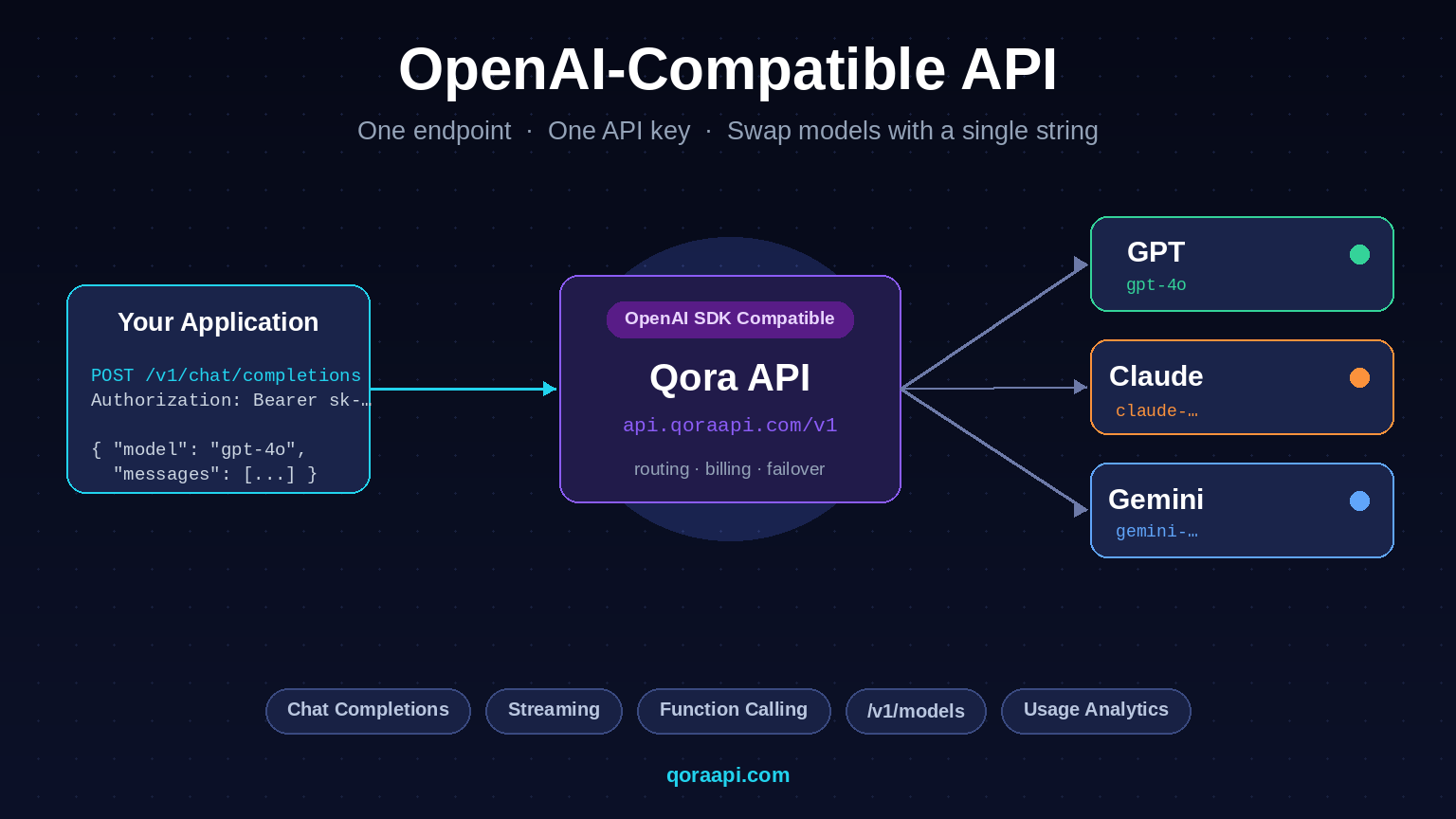
From a developer’s point of view the flow is straightforward. Your application sends a Chat Completions request to a single URL, identifies itself with a Bearer token, and names the model it wants. The provider authenticates the request, looks up the model in its routing table, forwards the request to the correct upstream (OpenAI, Anthropic, Google, an open-source host, or its own inference stack), and returns the result in the same JSON envelope OpenAI uses.
The diagram below summarises the flow. The application on the left never needs to know which provider is on the other side — it only knows the base_url and a model name.
For a deeper explanation of the broader category, see our guide on what an AI API gateway is, and the practical steps to integrate an AI API into a real application.
One endpoint for GPT, Claude and Gemini
The most useful feature of an OpenAI-compatible API is that the same code path can call multiple models. You choose the model per request — or per feature in your product — without redeploying anything. The table below shows what an OpenAI-compatible payload looks like across the three most popular model families.
| Model family | Example model string | Best for |
|---|---|---|
| OpenAI GPT | gpt-4o, gpt-4o-mini, o1-mini | General reasoning, tool use, structured output |
| Anthropic Claude | claude-3-5-sonnet, claude-3-haiku | Long-form writing, nuanced instruction following, code review |
| Google Gemini | gemini-1.5-pro, gemini-1.5-flash | Long context, multimodal input, fast and cheap responses |
Behind the scenes, an aggregator translates the OpenAI-shaped payload into the format each upstream provider expects (Anthropic’s /v1/messages and Google’s generateContent both use different request and response shapes), runs the call, and normalises the answer back to the OpenAI shape your client expects. Your application sees one consistent response no matter which model answered.
Code examples you can paste today
These three snippets are identical in structure — the only thing that changes between providers is base_url and the model string. Replace the placeholder with a key from any OpenAI-compatible provider (here we use Qora API as the example) and the same code calls GPT, Claude, or Gemini.
cURL
curl https://qoraapi.com/v1/chat/completions \
    -H "Authorization: Bearer $QORA_API_KEY" \
    -H "Content-Type: application/json" \
    -d '{
      "model": "gpt-5",
      "messages": [
        {"role": "user", "content": "Explain OpenAI-compatible APIs in one paragraph."}
      ]
    }'
Python (official OpenAI SDK)
from openai import OpenAI

client = OpenAI(
    base_url="https://qoraapi.com/v1",   # <-- the only line that changes
    api_key="YOUR_API_KEY",
)

resp = client.chat.completions.create(
    model="claude-sonnet-4-5-20250929",                # <-- swap to gpt-4o or gemini-1.5-pro
    messages=[
        {"role": "system", "content": "You are a concise technical writer."},
        {"role": "user", "content": "Summarise what an OpenAI-compatible API is."},
    ],
)
print(resp.choices[0].message.content)
Node.js (official OpenAI SDK)
import OpenAI from "openai";

const client = new OpenAI({
  baseURL: "https://qoraapi.com/v1",     // <-- the only line that changes
  apiKey: process.env.QORA_API_KEY,
});

const completion = await client.chat.completions.create({
  model: "gemini-2.5-flash",                    // <-- swap to any supported model
  messages: [
    { role: "user", content: "Give me 3 use cases for an AI API gateway." },
  ],
});

console.log(completion.choices[0].message.content);
The same pattern works in LangChain (ChatOpenAI(base_url=...)), LlamaIndex, and the Cursor / Continue VS Code extensions. If your tool already speaks OpenAI, you can switch the underlying model by changing two values: the base URL and the model name.
How to pick an OpenAI-compatible provider
Not every “compatible” provider is identical. When you evaluate one, look at these criteria:
- Model coverage. Does it expose the models you actually want (GPT, Claude, Gemini, plus open-source)? Are model names documented and stable?
- Feature parity. Does it support streaming, function calling, JSON mode, vision input, and system messages? Some providers silently drop advanced features.
- Latency and uptime. An extra hop adds network time. Look for providers that operate in regions close to you and publish transparent status pages.
- Pricing transparency. Pricing should be predictable and ideally marked up at a clear, fixed rate over upstream cost. Hidden fees or credit systems make cost forecasting hard.
- Key and account management. Can you create separate keys per environment (dev / staging / prod)? Can you set usage limits and rotate keys?
- Compatibility. Some providers limit request sizes or strip certain fields. Always run a smoke test of your real production payload before committing.
Our detailed walkthrough of how to choose the best AI API gateway expands each of these points and compares the leading options.
Get started with Qora API in two minutes
Qora API is a developer-focused AI API gateway built around the OpenAI protocol. It exposes a single https://qoraapi.com/v1 endpoint that lets you call GPT, Claude, and Gemini models with the same key and the same code path you would use against OpenAI directly.
- Sign up at qoraapi.com and top up $50 (the minimum top-up). Get $5 free trial credit on request — contact us at [email protected] and we’ll add $5 to your account.
- Create an API key in the dashboard and store it as an environment variable (for example
QORA_API_KEY). - Point the OpenAI SDK at https://qoraapi.com/v1, pick any supported model name, and send a request.
- Track usage, latency, and per-key spend directly in the dashboard.
Because the interface is identical to OpenAI’s, you can keep your existing client code, your retry logic, your LangChain setup, and your CI tests — only the base endpoint and the model string change. To go deeper into the implementation side, read our guide to integrating an AI API into your application.
Frequently asked questions
What does “OpenAI-compatible” actually mean?
It means the service accepts HTTP requests in the same format OpenAI uses — typically /v1/chat/completions and /v1/models — with the same JSON body, the same Authorization: Bearer <key> header, and the same response envelope. The official OpenAI SDKs and most third-party tools can point at it just by changing base_url.
Can I use the same API key for GPT, Claude and Gemini?
Yes, when the key is issued by an OpenAI-compatible aggregator that has access to all three providers. The same key authenticates requests for any model the gateway routes, and you select the model per request by changing the model field in the JSON body.
Do I need to rewrite my code to switch providers?
No. The only change most clients need is the base_url (or apiBase / api_base, depending on the SDK) and the model name. Everything else — message format, streaming, function calling, retries — works without modification.
Do OpenAI-compatible APIs support streaming and function calling?
Most well-built providers do, but feature coverage varies. Before adopting a provider, verify that it supports the exact features you depend on: server-sent event streaming, JSON mode, tool/function calling, vision inputs, and long context windows. Reputable providers document these explicitly.
Is an OpenAI-compatible API the same as an AI API gateway?
An OpenAI-compatible API is the contract the gateway exposes; an AI API gateway is the broader product that sits between your application and many upstream model providers. A gateway can be OpenAI-compatible (and most modern ones are), but the gateway also handles authentication, billing, rate limits, and routing, while “OpenAI-compatible API” only describes the wire format.
Is using an OpenAI-compatible relay more expensive than calling providers directly?
It depends on the relay. Some add a markup on top of upstream cost, others pool volume to negotiate lower rates than a single account can get, and a few expose upstream cost directly. Always check the published price per million tokens for each model before deciding.
An OpenAI-compatible API turns the OpenAI SDK into a universal client for the entire AI ecosystem. Once your application talks this protocol, you can route any feature in your product to GPT, Claude, or Gemini without touching application code, switch providers in minutes, and consolidate keys and billing into a single account. If you are ready to try it, create a key at qoraapi.com and point your existing OpenAI client at https://qoraapi.com/v1.
More guides in the AI API series
Continue building your AI API stack: AI Function Calling Explained: Tools, JSON Schema, and the Tool-Use Loop · How to Switch AI Providers Without Rewriting Your Code · Multimodal AI APIs: Working with Vision and Audio · How to Reduce AI API Costs.
Leave a Reply